
Agent Pulse
Free, open-source desktop app that shows live status, usage, analytics, and guardrails for AI coding agents on your machine.
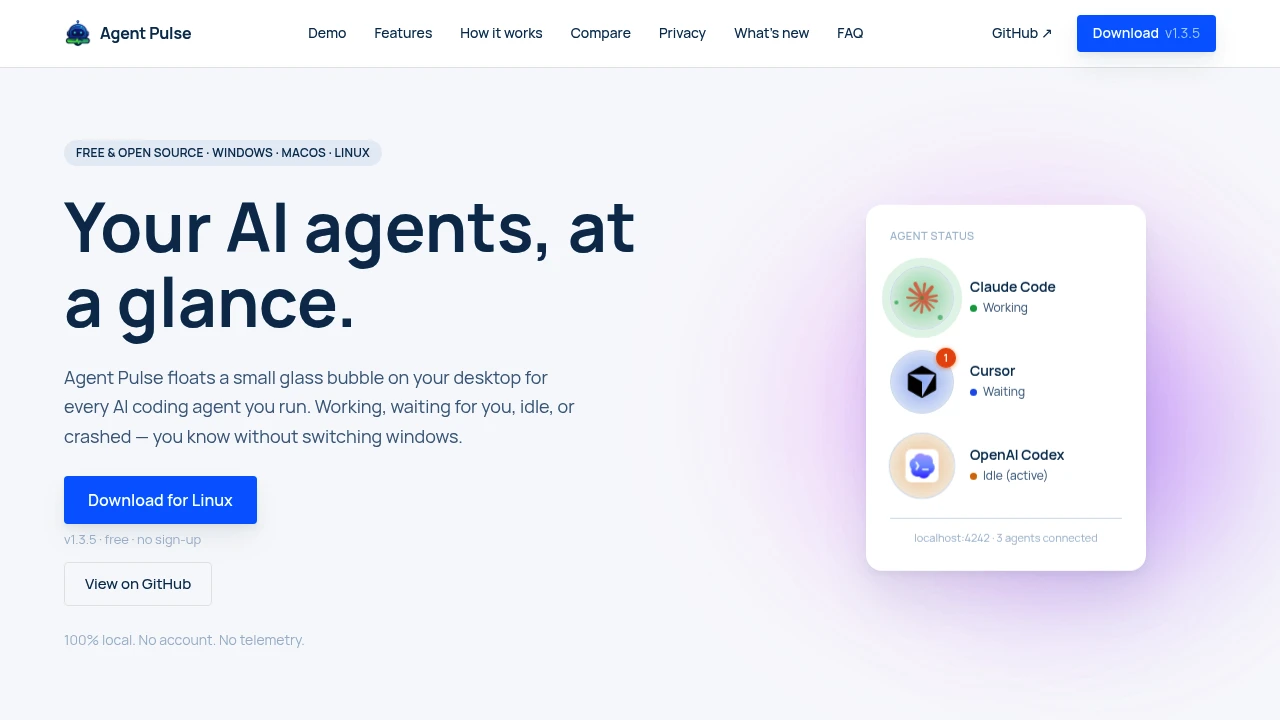
This desktop app gives developers a single place to monitor AI coding agents running across different tools. Instead of switching between terminals, editors, and agent interfaces, always-on-top status bubbles show whether each agent is working, waiting for input, idle, or has crashed.
It supports Claude Code, Cursor, GitHub Copilot, OpenAI Codex, Kiro, and Antigravity. The app runs fully locally with no account, telemetry, or Agent Pulse server, keeping agent events on the user's machine while providing a unified view of activity, usage, analytics, and safety controls.
Key Features
Ambient Agent Status Bubbles
Persistent status bubbles provide an always-visible overview of connected AI coding agents.
Each bubble can be:
- Dragged to a preferred position
- Kept persistent between sessions
- Used to quickly identify the current agent state
- Viewed without opening the underlying coding tool
Color-coded states make it easier to distinguish active, waiting, idle, and crashed agents at a glance.
Multi-Agent Support
The app brings lifecycle information from multiple AI coding tools into one interface.
Supported agents include:
- Claude Code
- Cursor
- GitHub Copilot
- OpenAI Codex
- Kiro
- Antigravity
A local bridge normalizes lifecycle hooks from these tools so their activity can be viewed consistently.
Live Usage Meters
Track quota windows for supported coding agents without opening each individual application.
Live usage meters are available for:
- Claude Code
- Codex
- Cursor
- Antigravity
This provides a quick way to understand current usage alongside agent status.
Local Analytics
Agent activity is stored locally in SQLite, providing historical visibility into how coding agents are being used.
Analytics include:
- Daily digests
- Activity heatmaps
- Tool mix
- Model usage
- Per-project breakdowns
This makes it easier to understand agent usage patterns across projects and over time.
Command Guardrails
The app can warn about or block risky shell commands before an AI agent executes them.
This adds a safety layer between an agent and potentially destructive terminal operations, giving developers an opportunity to review sensitive commands before they run.
Slack & Discord Alerts
Receive notifications when an AI coding agent has been waiting for too long.
This is useful for developers who start longer-running agent tasks and move away from the active coding window while still wanting to know when their attention is required.
Claude Code Status Line
A dedicated Claude Code status line provides additional session information, including:
- Model
- Context
- Branch
- Session cost
This gives Claude Code users more visibility into the active development session without needing to inspect the terminal directly.
Cowork Scheduler
The cowork scheduler keeps Claude's five-hour window warm through scheduled micro-pings.
This provides a way to maintain an active Claude Code working window during extended workflows.
Fully Local Operation
The application is designed around local operation.
It has:
- No account requirement
- No telemetry
- No Agent Pulse server
- Local event processing
- SQLite-based local analytics
Agent activity therefore remains on the user's machine rather than being sent to a central monitoring service.
Tray-Based Background Operation
The app can remain active from the system tray while staying out of the way during normal development work.
Quiet updates and tray behavior allow monitoring to remain available without requiring another constantly open application window.
Built For AI-Assisted Developers
The app is particularly useful for developers who regularly work with multiple coding agents.
It is designed for:
- AI-heavy developers running several coding agents
- Software engineers switching between agent-enabled development tools
- Power users managing long-running agent sessions
- Development teams wanting clearer visibility into agent activity
- Open-source developers who want an inspectable local monitoring tool
- Developers concerned about command safety who want guardrails around agent-generated shell commands
Common Use Cases
- Multi-agent monitoring: See several coding agents without switching between their individual interfaces.
- Long-running tasks: Keep track of agents working on extended coding jobs.
- Waiting-state awareness: Get notified when an agent needs human input.
- Usage tracking: Monitor quota windows across supported AI coding tools.
- Project analytics: Review agent activity by project and model.
- Command safety: Warn or block risky shell commands before execution.
- Remote attention: Receive Slack or Discord alerts when an agent remains unattended.
- Claude Code workflows: Track model, context, branch, and session cost information.
- Agent productivity analysis: Use local analytics to understand tool and model usage patterns.
Why It Matters
Running multiple AI coding agents can create a visibility problem. Each tool may have its own interface, status indicators, usage limits, and workflow, making it easy to lose track of what is currently running or which agent needs attention.
This desktop app provides an ambient alternative. Persistent status bubbles keep agent states visible while developers continue working, while the local bridge brings different agent lifecycle events into a consistent view.
The local-first architecture is also important for development environments where source-code activity and agent events should not be sent to an external monitoring service. With no account, telemetry, or central Agent Pulse server, the application keeps its monitoring data on the machine.
Beyond visibility, features such as command guardrails, local analytics, usage meters, and Slack or Discord alerts turn the app into a broader control layer for AI-assisted development. Developers can see what their agents are doing, understand how they are being used, and intervene when necessary.
Monitor Every Coding Agent From One Place
Keep AI coding agents visible without constantly switching tabs or terminals. With ambient status bubbles, live usage meters, local analytics, command guardrails, notifications, and support for Claude Code, Cursor, Copilot, Codex, Kiro, and Antigravity, this desktop app provides a unified local view of AI-assisted development across Windows, macOS, and Linux.


