
Crator
Host ERPNext and create workflows, reports, forms, and integrations from plain-English requests, then review and publish them.
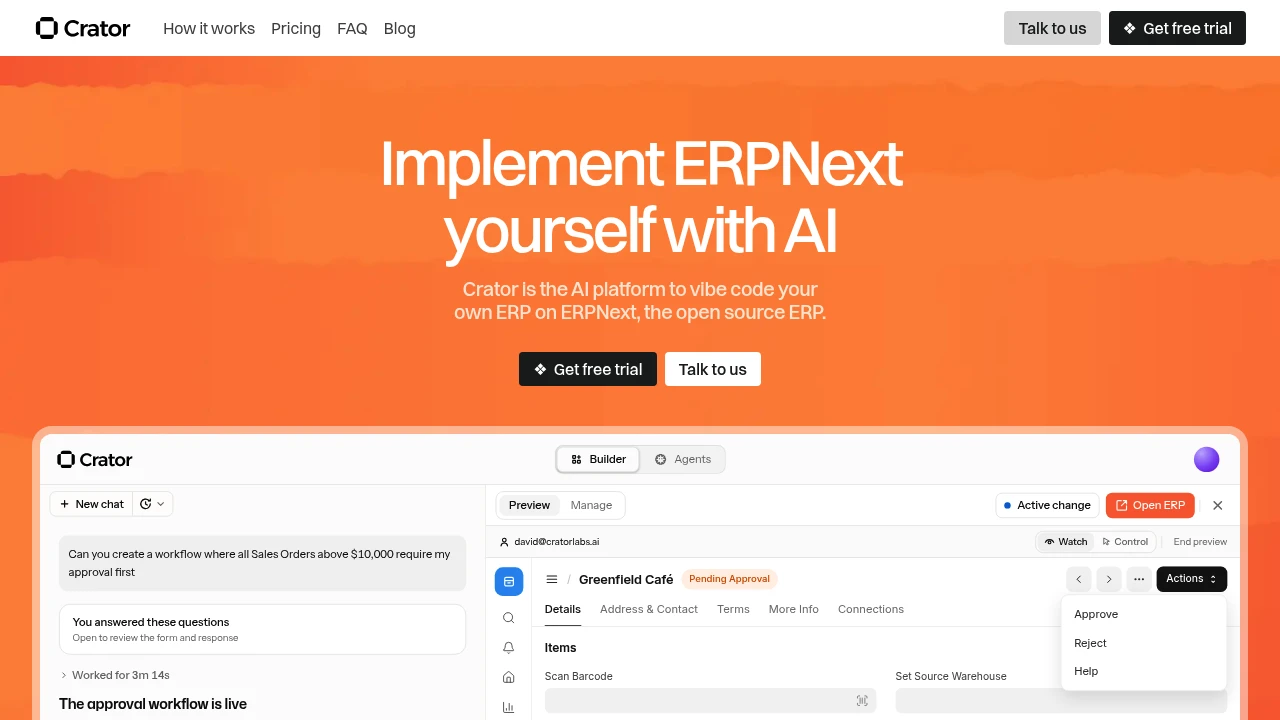
Crator helps teams tailor ERPNext without going through a traditional consulting cycle. It hosts your ERPNext site and uses AI to build the changes you describe, then lets you review those changes in a sandbox before they go live. The focus is on practical business customizations such as approvals, reports, custom views, forms, and integrations.
It works around ERPNext rather than replacing it, making it useful for businesses already using ERPNext across sales, inventory, accounting, HR, or project workflows. You describe the change in plain English, Crator asks follow-up questions when needed, builds the customization, and shows what changed before you approve it.
Key Features
AI-Powered ERPNext Customization
Describe the business change you need in plain language and let Crator build the corresponding customization.
- Explain changes in plain English
- Answer follow-up questions about the requirement
- Build custom ERPNext functionality
- Review changes before they go live
- Avoid writing code for every adjustment
Approval Workflows
Create approval processes around specific business rules and limits.
- High-value sales order approvals
- Purchase approval limits
- Custom business approval flows
- Process-specific controls
Custom Documents & Forms
Adapt ERPNext documents to match how your business actually works.
- Add new fields
- Create custom forms
- Build new document types
- Adjust existing ERPNext workflows
Reports & Dashboards
Create reporting tools for different teams and business functions.
- Finance reports
- Operations reporting
- Management dashboards
- Custom business views
Custom Views
Build different ways to work with ERPNext data.
- List views
- Kanban views
- Calendar views
- Workflow-specific interfaces
Integrations & Automations
Connect ERPNext with external systems and business workflows.
- IndiaMART integrations
- WhatsApp workflows
- Telecaller tools
- External APIs
- Custom automations
Sandbox-Based Review
Test customizations before publishing them to the live ERPNext environment.
- Separate sandbox environment
- Review changes before approval
- Publish approved changes
- Roll back when required
Built For ERPNext Customization
Crator is designed for businesses that already know how they want their processes to work but don't want to depend on developers or consultants for every ERPNext adjustment.
It is particularly suited to:
- ERPNext businesses adapting the platform to their processes
- Operations teams building custom workflows
- Finance teams needing specialized reporting and approvals
- Sales teams requiring custom forms and processes
- HR teams adapting ERPNext workflows
- Project teams creating specialized views and automations
Common Use Cases
Custom Approval Processes
Add approval rules for sales orders, purchases, spending limits, and other business processes without building the workflow manually.
Custom ERPNext Forms
Add fields, document types, and forms that reflect the way your organization collects and manages information.
Business Reporting
Create custom reports and dashboards for finance, operations, management, and other teams.
External Integrations
Connect ERPNext with services such as IndiaMART, WhatsApp, telecaller platforms, and other systems through APIs and automations.
Workflow Customization
Adapt ERPNext's existing processes to match internal business requirements rather than changing the way the business operates around the software.
Hosted ERPNext Infrastructure
Crator also provides the infrastructure needed to run the ERPNext environment.
The setup includes separate sandbox and live environments, allowing teams to test changes before publishing them. It also provides rollbacks, snapshots, and backups to help protect the live system while customizations are being developed.
Review Changes Before They Go Live
One of the core parts of the workflow is the separation between building and publishing.
You can describe a change, let Crator build it, review the result in the sandbox, and approve it before it reaches the live ERPNext site. This provides a way to experiment with customizations without immediately changing the production environment.
ERPNext Migration
Crator can also help businesses move an existing ERPNext site from another server. The migration support is intended for ERPNext sites hosted on Crator's platform.
Why It Matters
ERPNext can support many different business processes, but adapting an ERP system to a specific organization can traditionally involve developers, consultants, and repeated implementation work.
Crator focuses on making those adjustments more accessible through plain-language requests and AI-assisted customization. The combination of hosted infrastructure, sandbox testing, review, and rollback options gives teams a way to make changes while keeping the live environment separate from experimentation.
Tailor ERPNext to Your Business
Describe the workflows, reports, forms, views, and integrations you need, then use AI to build and review the changes before deploying them to your ERPNext environment.


