
FilezyAI
Convert, compress, resize, rename, and strip metadata on images, PDFs, and Office files in the browser.
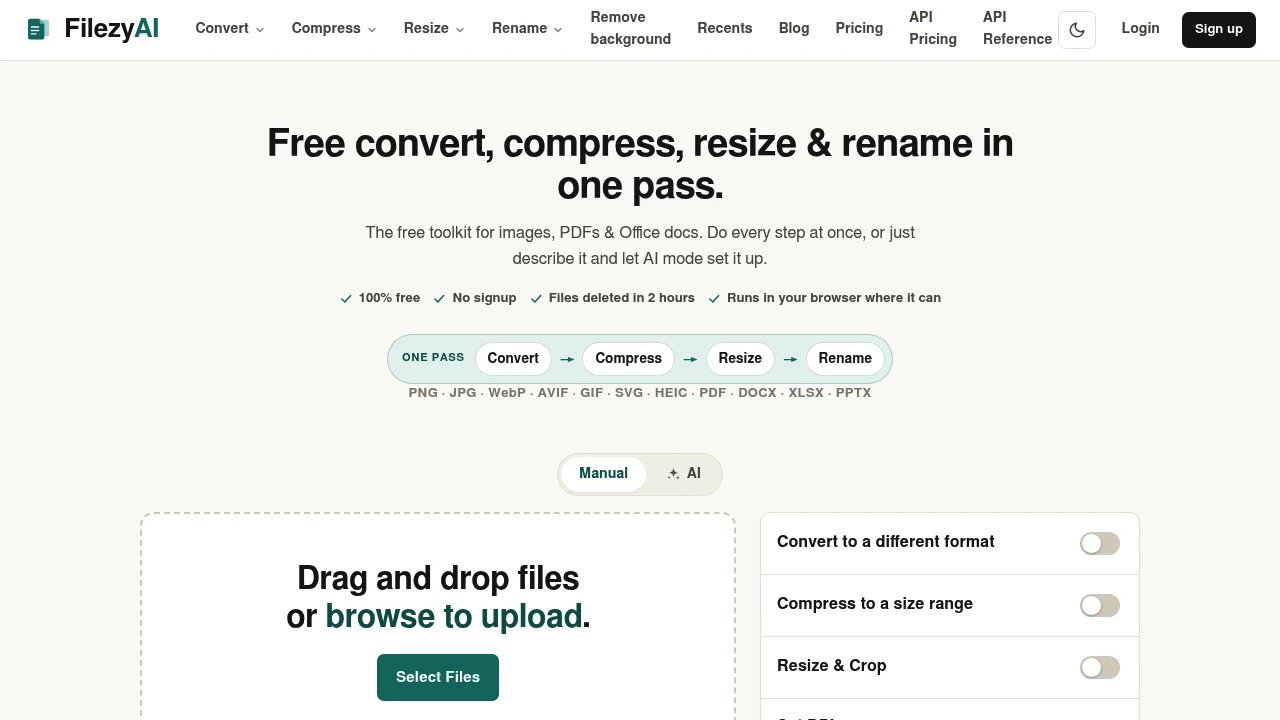
FilezyAI is a free browser-based file toolkit for handling images, PDFs, and Office documents in one workflow. It brings conversion, compression, resizing, cropping, DPI adjustment, renaming, and metadata removal together so you can prepare a file for an upload portal, email attachment, print requirement, or sharing standard without switching between multiple tools.
Instead of processing a file one step at a time, FilezyAI applies the required changes together and provides a finished file for download. It supports 12 file formats and can target specific file-size requirements, making it particularly useful when a portal or service specifies a limit in KB rather than simply asking for a smaller file.
Key Features
Multi-Format File Conversion
FilezyAI supports conversion across a range of common image, document, and Office formats.
Supported formats include:
- PNG
- JPG
- WebP
- AVIF
- GIF
- SVG
- HEIC
- DOCX
- XLSX
- PPTX
This makes it possible to handle different file preparation tasks from one browser-based workflow.
Exact-Size Compression
Instead of relying only on general quality settings, FilezyAI can target a specific file-size range.
This is particularly useful when an upload form specifies requirements such as:
- Maximum file size in KB
- A defined size range
- Smaller email attachments
- Portal-specific upload limits
The goal is to produce a file that fits the required limit rather than simply reducing quality by an arbitrary amount.
Resize & Crop
Adjust image dimensions for different destinations without moving the file between separate applications.
Common applications include:
- Web images
- Social media assets
- Print preparation
- Physical output
- Portal uploads
Cropping can also help create the required framing or dimensions before the final file is downloaded.
DPI Control
FilezyAI provides DPI control for print-oriented files.
This makes it possible to adjust resolution requirements when preparing files for physical printing or other workflows where DPI matters.
Output File Renaming
Rename the processed file before downloading it.
This is useful when a portal, client workflow, or internal filing system requires a specific filename or naming convention.
Metadata Removal
Remove potentially unnecessary metadata before sharing a file.
The toolkit can strip information such as:
- EXIF data
- GPS information
- Camera data
This provides a simple way to clean files before sending or publishing them.
Browser-Based Processing
FilezyAI works directly in the browser where possible and does not require an account or signup.
This keeps routine file preparation accessible without adding another desktop application or account to the workflow.
Temporary File Storage
Files processed through the service are temporary and are deleted two hours after processing.
This gives users a defined window to retrieve their finished files without treating the platform as permanent file storage.
AI-Powered File Workflows
The AI mode lets users describe the desired result rather than manually selecting every processing step.
Instead of specifying each operation individually, users can describe what they need the final file to look like or how it needs to be prepared, making the workflow more accessible for less technical users.
Built For Students, Freelancers & Teams
FilezyAI is useful for anyone who regularly needs to prepare files for specific technical or sharing requirements.
It is particularly suited to:
- Students preparing documents and images for form or portal uploads
- Freelancers preparing client assets
- Small teams cleaning up documents and product images
- Developers handling repeatable file-processing workflows
- Professionals preparing files for email, print, or online submission
- Anyone working with multiple file formats who wants one browser-based toolkit
Common Use Cases
- Portal uploads: Compress and resize files to meet strict upload requirements.
- Email preparation: Reduce file sizes before attaching images or documents.
- Print preparation: Adjust dimensions and DPI for physical output.
- Social media assets: Resize and crop images for specific formats.
- Client delivery: Rename, optimize, and clean files before sharing.
- Product images: Convert, resize, compress, and remove unnecessary metadata.
- Document preparation: Convert supported Office and PDF files within the same workflow.
- Privacy cleanup: Strip EXIF, GPS, and camera information before sharing images.
- Developer workflows: Use a consistent file-processing approach and potentially integrate the workflow through an API later.
Why It Matters
Preparing a file for a specific destination often involves several small operations. You might convert an image, download it, resize it somewhere else, compress it again, rename the output, and finally remove metadata before sharing it.
FilezyAI brings those steps together into a single pass. You can work toward a specific file size, dimension, DPI requirement, filename, or metadata state and download the finished result once.
The exact-size compression capability is particularly useful for workflows where the requirement is expressed as a concrete KB limit. Browser-based processing and no-signup access also make the toolkit convenient for quick, one-off file preparation.
For students, freelancers, and small teams, that means less time moving files between separate utilities. For developers, the same workflow can provide a foundation for repeatable file processing through an API.
Prepare Files in One Pass With FilezyAI
Convert, compress, resize, crop, rename, and clean supported files from one browser-based toolkit. With multi-format support, exact-size compression, DPI control, metadata removal, and an AI mode for describing the desired result, FilezyAI simplifies file preparation when the final file needs to meet a specific requirement.