
Speech Generation
Turns text into human-like speech in 18 languages and downloads MP3s, with no sign-up and commercial use included.
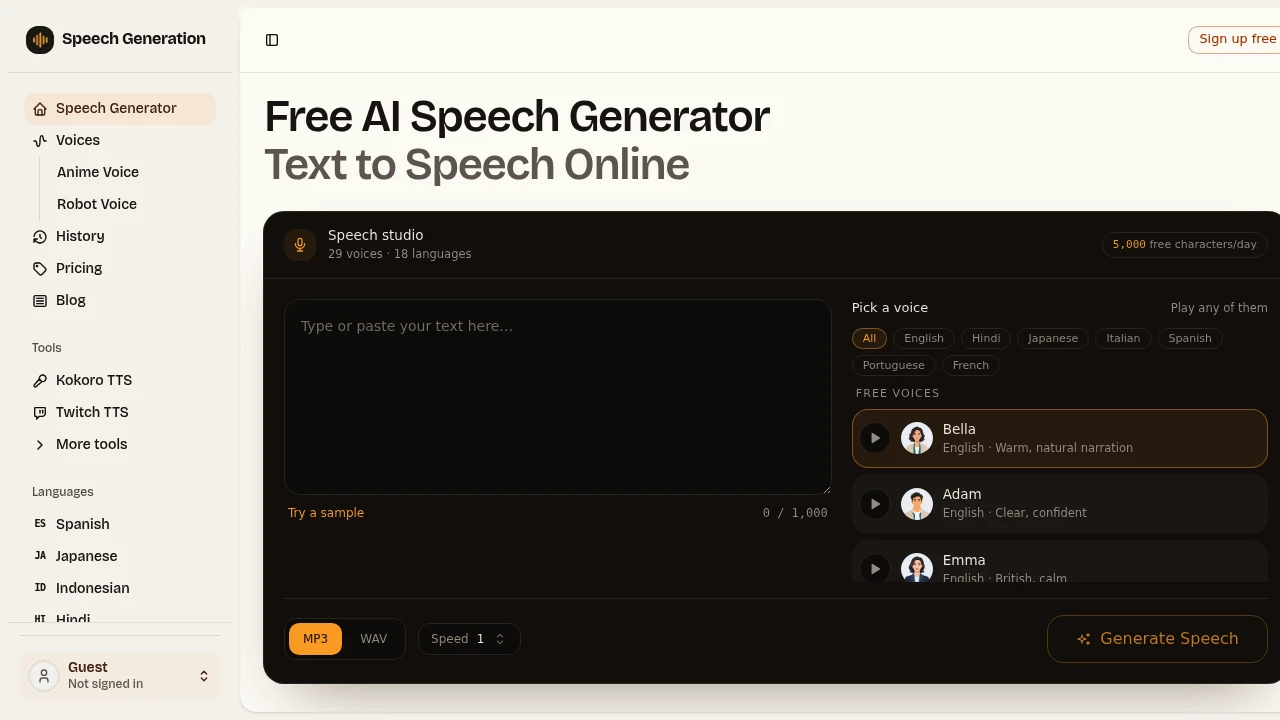
This free text-to-speech tool turns scripts, articles, and short notes into natural-sounding audio without requiring you to record your own voice. It is designed for creators, teachers, marketers, and anyone who needs voiceovers for videos, podcasts, courses, or other projects.
You can use the tool as a guest, preview available voices before generating audio, and download finished speech as MP3. Registered users can also export WAV files, while commercial use is included for both free and paid audio.
Key Features
Natural-Sounding AI Voices
Choose from 29 voices across 18 languages, with different delivery styles for different types of content.
Voice options include:
- Warm narration
- Clear conversational reads
- Deep voices
- Expressive delivery
- Multiple language and regional voice options
The sample library includes voices in English, Hindi, Japanese, Italian, Spanish, Portuguese, and French, among others.
Preview Voices Before Generating
Every voice can be heard before you generate your final audio. This makes it easier to compare different delivery styles using the same script and select the voice that fits your project.
You can test free, premium, and ultra voices before committing credits to a generation.
Free Text-to-Speech Without Sign-Up
The tool can be used as a guest without creating an account. Free users can generate up to 5,000 characters per day.
This makes it practical for quickly testing a script, previewing a voiceover, or producing shorter pieces of audio without going through a registration process.
Commercial Use Included
Generated audio can be used commercially, including in:
- Monetized videos
- Podcasts
- Advertisements
- Client projects
- Other commercial content
Both free and paid audio can be used for these purposes.
MP3 and WAV Export
Finished audio can be downloaded in common formats for use across different content workflows.
MP3 downloads are available for generated audio, while WAV export is available to registered users.
These formats can be used with video editors, course platforms, podcast workflows, and other audio production tools.
Multiple Voice Tiers
The platform offers different voice quality and style tiers.
Free voices are available without requiring credits, while premium and ultra voices use credits. These credits never expire, allowing users to save them for projects where higher-quality or more specialized voice delivery is needed.
18 Language Support
With voices spanning 18 languages, the tool can support multilingual content creation and localization.
Its voice library includes dedicated options for major languages, making it useful for creators producing content for audiences in different markets.
Multiple Speech Engines
The platform uses several speech-generation engines rather than relying on a single model.
Its supported engines include:
- Kokoro
- Chatterbox
- Zonos
- Orpheus
- Fish Audio
- MiniMax
- ElevenLabs
Using multiple engines provides a broader selection of voice characteristics and delivery styles within the same text-to-speech workflow.
Built For Creators and Content Teams
Content creators can turn scripts into voiceovers without recording themselves, making the tool useful for videos, social content, and other media.
Teachers and educators can convert written lessons, notes, and learning materials into spoken audio.
Marketers can create voiceovers for advertisements, product content, and promotional videos.
Freelancers and agencies can produce commercial audio for client projects while testing different voices before generation.
Common Use Cases
Video Voiceovers
Turn written scripts into narration for videos without setting up a microphone or recording session.
Podcast Production
Convert prepared scripts, short segments, or other written material into spoken audio for podcast workflows.
Educational Content
Teachers and creators can transform lessons, articles, and notes into audio that can be used alongside written learning materials.
Marketing and Advertising
Create voiceovers for ads, promotional videos, and other marketing assets using voices suited to different styles and audiences.
Multilingual Content
Generate spoken versions of content across supported languages when producing material for international audiences.
Client Projects
Use commercially licensed generated audio for client work, giving freelancers and agencies another option for producing voiceovers without recording talent for every project.
Why It Matters
Text-to-speech is most useful when it removes the recording step without making the resulting audio feel overly mechanical. This tool focuses on giving users a broad voice selection while keeping the entry point simple.
The combination of guest access, 5,000 free characters per day, voice previews, commercial use, and multiple speech engines makes it possible to test the workflow before paying. For users who need more specialized delivery, premium and ultra voices provide additional options without forcing them into an expiring credit system.
Turn Text Into Audio
This free text-to-speech tool provides a straightforward way to turn scripts, articles, and notes into downloadable audio. With 29 voices, 18 languages, multiple speech engines, voice previews, MP3 and WAV exports, and commercial use, it gives creators, educators, marketers, and businesses a flexible way to produce voiceovers without recording them manually.