
promptsref
A curated library of 10,000+ public image and video prompts for GPT Image, Midjourney, Nano Banana, and Seedance.
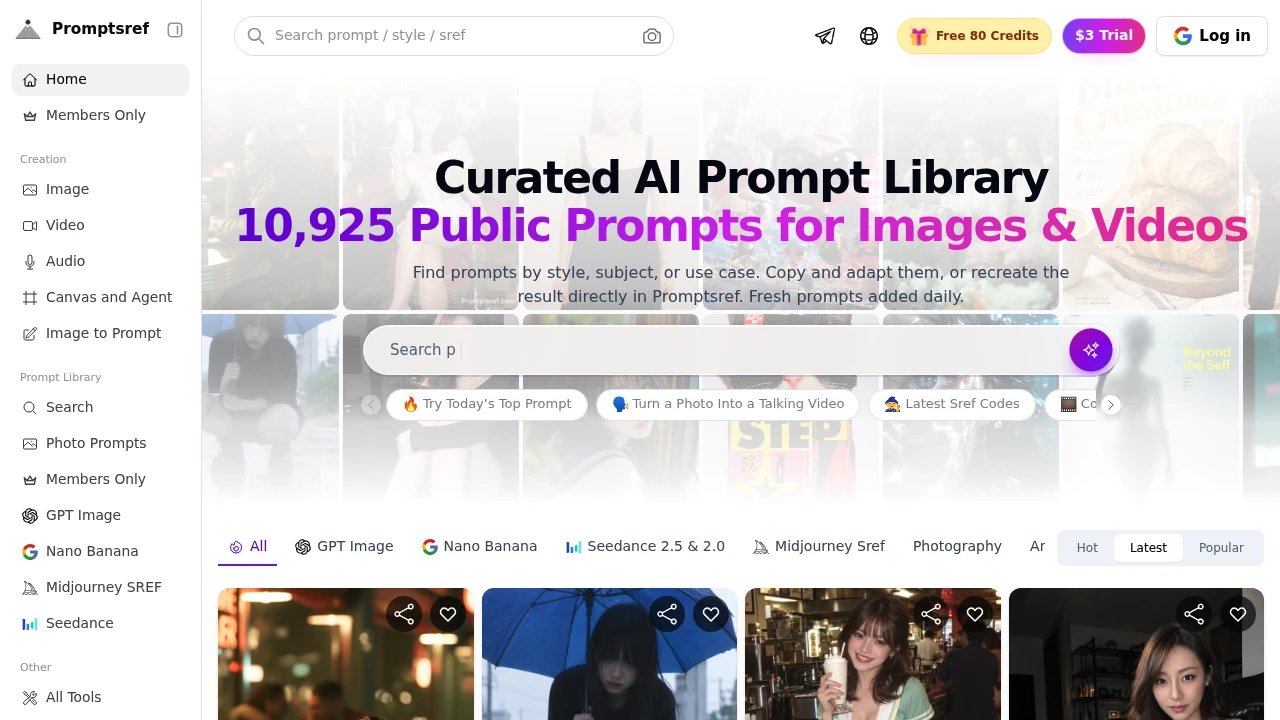
Promptsref is a visual prompt library for creators who want proven starting points for AI-generated images and videos. Instead of writing prompts from scratch, users can browse public prompts alongside the actual generated results, making it easier to find a style, subject, or visual direction that matches what they want to create.
The platform is built for designers, marketers, video creators, and solo makers using AI for visual work. Users can search by model, style, subject, or use case, then copy a prompt, adapt it to a different subject, or recreate the result directly in Promptsref. Most public prompts are free to browse, while some entries are available to members.
Key Features
Real Visual Results
Promptsref connects prompts directly to the images or videos they produced.
Instead of evaluating a prompt based only on its wording, creators can see the resulting work and assess details such as:
- Composition
- Lighting
- Subject treatment
- Visual style
- Overall direction
This makes it easier to decide whether a prompt is worth adapting before using it in a new project.
AI Model Collections
Browse prompts organized around popular visual AI models, including:
- GPT Image
- Nano Banana
- Midjourney
- Seedance
The model-specific organization helps creators find prompts suited to the generation system they are working with.
Visual Categories
Explore prompts based on the type of visual result you're looking for.
Categories include:
- Anime
- Ads
- Illustration
- 3D
- Wallpaper
- Character design
This provides a faster way to move from a general creative need to relevant examples.
Prompt Search & Discovery
Search and browse the library using different criteria.
Creators can find prompts by:
- AI model
- Style
- Subject
- Use case
This makes the collection useful both for quick inspiration and for finding specific visual references.
Copy & Customize Workflow
Prompts are designed to be reused rather than simply viewed.
Users can:
- Copy prompts
- Customize existing prompts
- Adapt prompts to new subjects
- Recreate results directly inside Promptsref
This gives creators a practical starting point for their own visual generation workflows.
Community-Curated Prompts
Public prompts are reviewed before publication and organized for easier discovery.
The library is updated daily, creating a continuously growing collection of image and video examples from the community.
Built For Visual Creators
Promptsref is designed for creators who use AI generation as part of their visual workflow.
It can be useful for:
- Designers
- Marketers
- Video creators
- Solo makers
- AI artists
- Creative teams
- Anyone looking for visual prompt references
Common Use Cases
Creative inspiration: Browse generated examples to discover new visual directions and styles.
Prompt research: Find prompts that already demonstrate the type of result you're trying to achieve.
Advertising concepts: Explore AI-generated ad visuals and adapt prompts for marketing campaigns.
Product visuals: Find relevant references for product shots and commercial imagery.
Character design: Discover character-focused prompts and adapt them to new subjects.
Video creation: Browse Seedance examples for image-to-video concepts, motion, and scene changes.
Prompt experimentation: Copy an existing prompt and modify its subject, style, or creative direction.
Model-Specific Prompt Discovery
Promptsref organizes its library around what different models are particularly useful for.
GPT Image entries emphasize readable text and clean layouts.
Midjourney prompts focus on artistic directions and SREF styles.
Nano Banana examples are oriented toward product shots and maintaining consistent subjects.
Seedance entries focus on turning images into video, including motion and scene changes.
This structure helps creators start with the model that best matches the visual result they are trying to produce rather than searching through unrelated prompts.
Browse Prompts With Their Results
A major advantage of the library is that the generated work sits alongside the prompt that created it. This gives creators visual context before they decide to reuse or adapt a prompt.
For example, someone looking for a particular lighting treatment can inspect the actual output, while someone researching character consistency can see how the prompt handles the subject. The visual result provides a reference point that a text-only prompt library cannot offer.
Why It Matters
Writing effective prompts from scratch can involve repeated experimentation, especially when the desired result depends on composition, lighting, style, or model-specific behavior. A prompt paired with a real generated result provides a much clearer starting point.
Promptsref focuses on this relationship between prompt and output. Its model collections, visual categories, search tools, community curation, and daily updates make it easier to discover examples, understand what produced them, and adapt successful starting points to new creative projects.
Find Visual Prompts That Already Have a Result
Explore image and video prompts alongside the work they produced, then copy, customize, and reuse them for your own projects. With model-specific collections, visual categories, searchable examples, community curation, and real generated outputs, Promptsref gives creators a practical starting point for AI visual generation without beginning every prompt from scratch.