
SpendCull
Upload a bank or card CSV to flag duplicate tools, zombie subscriptions, and estimated savings without sharing account access.
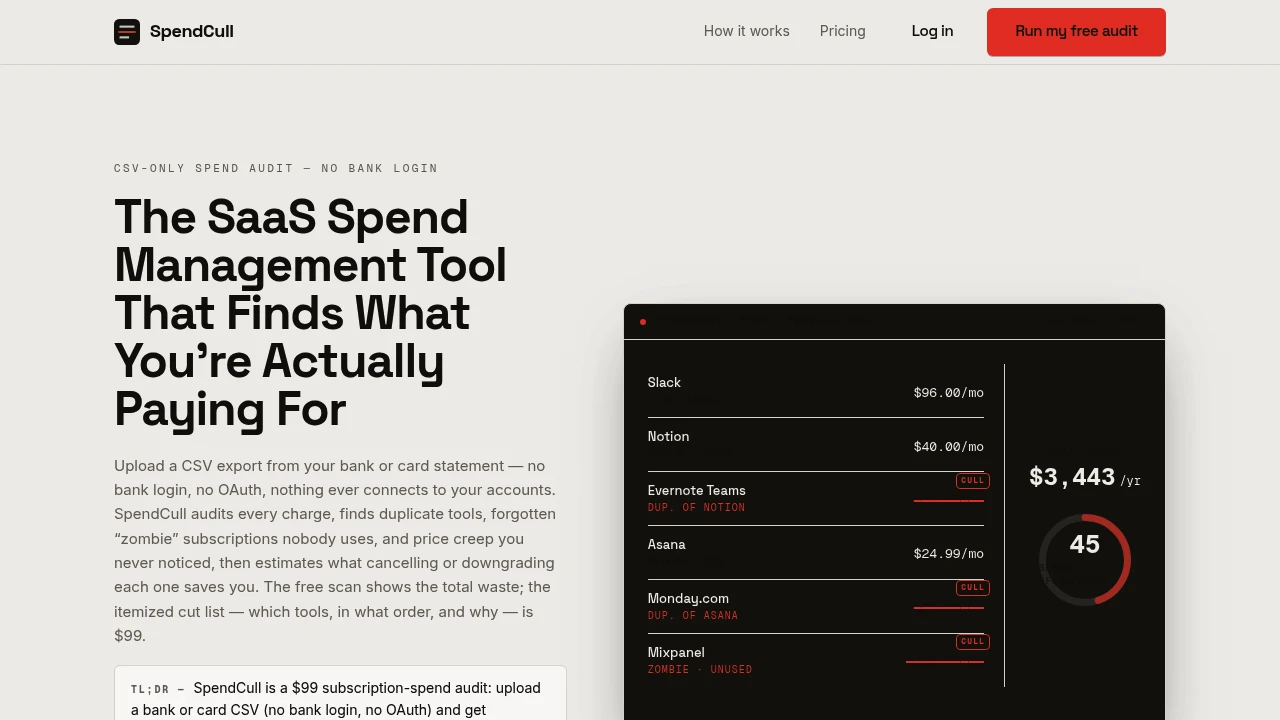
SpendCull is a CSV-based subscription spend audit platform that helps teams and finance-minded operators identify unnecessary software costs from bank or card statement exports. It analyzes recurring charges without requiring bank logins, OAuth connections, or direct access to financial accounts, making it easier to review SaaS spending while keeping account access disconnected.
The platform is designed for small teams, operations leads, finance-conscious founders, and anyone responsible for reviewing recurring business expenses. Instead of manually scanning statement exports for duplicate tools, forgotten subscriptions, or increasing prices, SpendCull helps users upload or paste CSV data and receive a structured analysis of potential waste.
Key Features
CSV-Only Subscription Audit
Analyze recurring spending without connecting bank accounts.
SpendCull works from CSV statement exports, allowing users to review subscription spending without:
- Bank logins
- OAuth connections
- Direct account access
- Continuous financial account syncing
Users can provide exported transaction data and run the audit independently of their banking or card provider.
Guided Column Mapping
Handle statement exports with different formats.
The platform includes guided column mapping to help process CSV files where:
- Headers are inconsistent
- Transaction columns use different names
- Export formats vary
- Data fields do not line up automatically
- Statement structures need manual mapping
This makes the audit more flexible when working with exports from different banks, cards, or financial systems.
Recurring Charge Detection
Identify subscriptions and repeated expenses.
SpendCull clusters recurring charges to help users spot:
- Repeated software payments
- Monthly subscriptions
- Regular service charges
- Similar transaction patterns
- Ongoing recurring expenses
This creates a clearer view of which tools and services are generating continuing costs.
Duplicate Tool Detection
Identify potentially overlapping software subscriptions.
The platform can flag tools that may serve similar purposes, such as:
- Multiple note-taking tools
- Overlapping project management platforms
- Duplicate productivity software
- Similar business applications
- Redundant SaaS subscriptions
These findings can help teams review whether they need to keep multiple tools performing comparable functions.
Zombie Subscription Detection
Surface subscriptions that may no longer be providing value.
The audit can flag recurring charges with no matching usage signal available in the submitted data.
Potential findings can include:
- Forgotten subscriptions
- Inactive tools
- Unused services
- Long-running recurring charges
- Subscriptions that may require review
This helps users identify expenses that may have continued after the original need disappeared.
Spend Efficiency Analysis
Get a high-level view of potential subscription waste.
The free scan provides:
- Total potential waste identified
- A spend-efficiency score
- One sample finding
- An initial view of recurring spending issues
This gives users a quick overview before deciding whether they need a more detailed audit.
Savings Estimates
Estimate the potential financial impact of each finding.
The audit can provide:
- Estimated savings
- Dollar impact
- Recurring cost analysis
- Potential reduction opportunities
- Financial value of flagged subscriptions
This helps users understand which changes could have the largest effect on overall software spending.
Prioritized Cut List
Turn audit findings into a list of recommended actions.
The paid report provides a prioritized cut list that ranks potential actions based on factors such as:
- Estimated savings
- Subscription cost
- Potential overlap
- Recurring waste
- Review priority
Each finding includes a short explanation of why the item was flagged, helping users decide what to cancel, downgrade, or investigate first.
Shareable Spend Audit Report
Create an output that can be reviewed or shared with others.
The audit results are structured as a report that can be used for:
- Internal budget reviews
- Finance discussions
- Operations planning
- Subscription cleanup
- SaaS cost reduction decisions
This makes it easier to hand findings to the person responsible for managing the budget or approving software expenses.
Ongoing Spend Monitoring
Run additional audits on future statement exports.
A monitoring option allows users to:
- Submit later CSV exports
- Re-run subscription audits
- Track recurring spending over time
- Identify new subscriptions
- Monitor potential waste
This extends the workflow beyond a one-time cleanup for teams that want periodic checks.
MCP Endpoint for AI Assistants
Run the free audit through an AI-assisted workflow.
SpendCull includes an MCP endpoint that allows an AI assistant to access the same free audit capability within a conversational workflow.
This can support use cases such as:
- AI-assisted spend reviews
- Conversational subscription analysis
- Automated financial workflow experiments
- Reviewing recurring costs through an internal assistant
Built for Subscription Spend Auditing
SpendCull combines CSV-based financial data intake, recurring charge detection, duplicate tool identification, zombie subscription detection, savings estimates, prioritized recommendations, spend-efficiency analysis, ongoing monitoring, and MCP-based AI access into one subscription spend auditing workflow.
Key benefits include:
- SaaS spend analysis
- CSV-based subscription auditing
- Duplicate software detection
- Forgotten subscription identification
- Savings estimation
- Prioritized cost-cutting recommendations
- No bank login or OAuth requirement
- Ongoing subscription monitoring
Built For
- Small Teams
- Startup Founders
- Operations Leads
- Finance-Minded Operators
- SaaS Buyers
- Budget Owners
- Business Managers
- Teams Reviewing Software Costs
Common Use Cases
- Auditing recurring SaaS expenses
- Finding forgotten subscriptions
- Identifying duplicate software tools
- Reviewing bank or card statement exports
- Estimating potential software savings
- Creating a prioritized subscription cut list
- Cleaning up unnecessary recurring expenses
- Sharing spend findings with finance or operations teams
- Monitoring subscription costs over time
- Running subscription audits through an AI assistant
Why It Matters
Subscription spending can become difficult to manage as teams add new software, experiment with tools, change workflows, or forget to cancel services that are no longer needed. Over time, recurring charges can accumulate across bank and card statements without anyone having a complete view of duplicate tools, inactive subscriptions, or rising costs.
SpendCull creates a simpler review process by working directly from CSV statement exports rather than requiring access to bank accounts or financial systems. Users can identify recurring charges, review potential duplicate tools, flag subscriptions that may no longer be useful, estimate possible savings, and receive a prioritized list of items to investigate. The workflow keeps account access disconnected while still providing a structured way to review and reduce unnecessary software spending.
Audit, Identify, Prioritize, and Reduce Subscription Spend From One Place
Upload or paste a CSV statement export, identify recurring software charges, detect duplicate and potentially forgotten subscriptions, review estimated savings, generate a prioritized cut list with reasons for each finding, track spend efficiency, run ongoing audits on future exports, and access the free audit through an MCP-enabled AI assistant workflow without connecting your bank account or sharing OAuth access.