
ASOGrade
Browser-based keyword research for iOS developers, using Apple Search Ads data to compare demand and ranking difficulty across 109 storefronts.
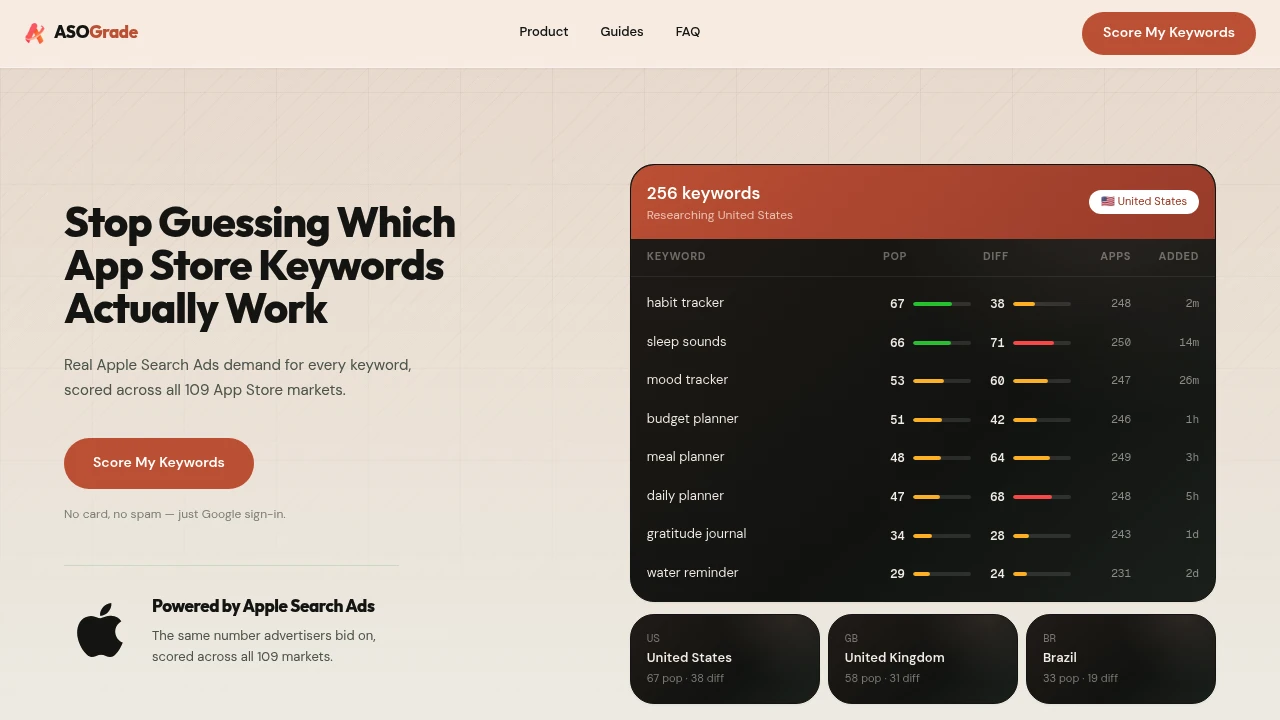
Research App Store keywords with Apple Search Ads data to understand search demand and ranking difficulty before changing your iOS app metadata. This lightweight keyword research tool helps developers and ASO specialists compare keywords across countries, identify opportunities, and decide which terms are worth targeting in an app name, subtitle, or keyword field.
The platform focuses specifically on App Store keyword research rather than full ASO management, keeping the workflow simple for developers who primarily need better keyword data. Popularity and difficulty scores are updated daily, while coverage across all 109 App Store storefronts makes it possible to evaluate search opportunities across different markets.
Key Features
Demand & Difficulty Scores
Evaluate each keyword using two 0–100 scores that combine search demand with ranking competition.
- Popularity score indicates keyword demand
- Difficulty score indicates how difficult the keyword is to rank for
- Compare multiple terms side by side
- Updated daily
Popularity is based on Apple Search Ads data, so the demand signal comes from advertiser activity rather than a guessed search-volume estimate. Difficulty is based on the apps currently occupying the top positions for the keyword.
All 109 App Store Storefronts
Research keywords across all 109 App Store storefronts instead of limiting analysis to a single country.
Compare the same keyword across different markets to see where search demand and ranking conditions may create better opportunities for your app.
This is particularly useful for developers targeting international users or deciding which countries deserve localized metadata.
Competitor Keyword Research
Discover the keywords associated with competing apps by pasting an App Store link.
This provides a straightforward way to investigate how competitors are being discovered and identify terms that may be worth researching for your own app.
- Paste an App Store URL
- View competitor keyword lists
- Research terms used by competing apps
- Identify additional keywords to evaluate
Keyword Opportunity View
Find keywords where demand and competition are more favorably balanced.
The opportunity view helps surface terms with higher demand and lower competition, making it easier to prioritize keywords rather than manually evaluating every score.
All-Store Keyword Comparison
Compare one keyword across multiple countries from a single view.
Instead of assuming that a keyword performs similarly everywhere, you can examine its scores across different storefronts and identify markets where the opportunity may be stronger.
Daily Updated Data
Keyword scores update daily, helping you work with current search behavior rather than relying on old reports.
Because popularity is tied to Apple Search Ads data and difficulty reflects current top-ranking apps, the tool provides a more current basis for keyword decisions.
Simple Browser-Based Workflow
The platform is designed around a focused keyword research workflow rather than a large ASO management suite.
You can research individual keywords, compare terms, investigate competitors, and examine international markets without managing a broader set of app optimization tools.
Google Sign-In
Get started with Google sign-in without providing a payment card.
The lightweight access model makes it easy for solo developers and teams to begin researching keywords before committing to a more involved ASO workflow.
Built For iOS Developers & ASO Specialists
This tool is designed for people who need reliable keyword research before making App Store metadata decisions.
- iOS developers choosing keywords for new or existing apps
- Solo app builders researching opportunities without a complex ASO platform
- ASO specialists comparing demand and ranking difficulty
- App marketers researching international storefronts
- Indie developers evaluating keywords before launch
Common Use Cases
Pre-launch keyword research: Evaluate potential keywords before deciding what to use in your app name, subtitle, or keyword field.
Metadata optimization: Compare existing terms with alternatives to identify keywords with stronger demand or more manageable competition.
Competitor research: Paste an App Store link to inspect competitor keyword lists and discover terms worth investigating.
International ASO: Compare the same keyword across different storefronts to find markets with stronger opportunities.
Keyword prioritization: Use demand, difficulty, and opportunity signals to narrow a large keyword list down to the terms most worth targeting.
Side-by-side research: Compare several keywords before committing limited metadata space to a particular term.
Why It Matters
App Store metadata gives developers limited space, so choosing keywords based on intuition alone can mean missing better opportunities. A keyword with strong demand may be difficult to rank for, while a less obvious term could offer a better balance between demand and competition.
By combining Apple Search Ads-based popularity data, ranking difficulty, daily score updates, competitor keyword research, and coverage across all 109 storefronts, this tool gives developers a focused way to evaluate those tradeoffs before changing their metadata.
Make Better App Store Keyword Decisions
Research keywords using current Apple Search Ads data, compare demand and difficulty across markets, inspect competitor terms, and identify opportunities where search demand is stronger relative to competition. With a narrow focus on keyword research, the tool keeps the process lightweight for iOS developers who want clearer data before optimizing their App Store metadata.


