
CodeBaseHub
A production React Native starter for Expo with Firebase auth, RevenueCat, OneSignal, and MCP servers for Claude Code and Cursor.
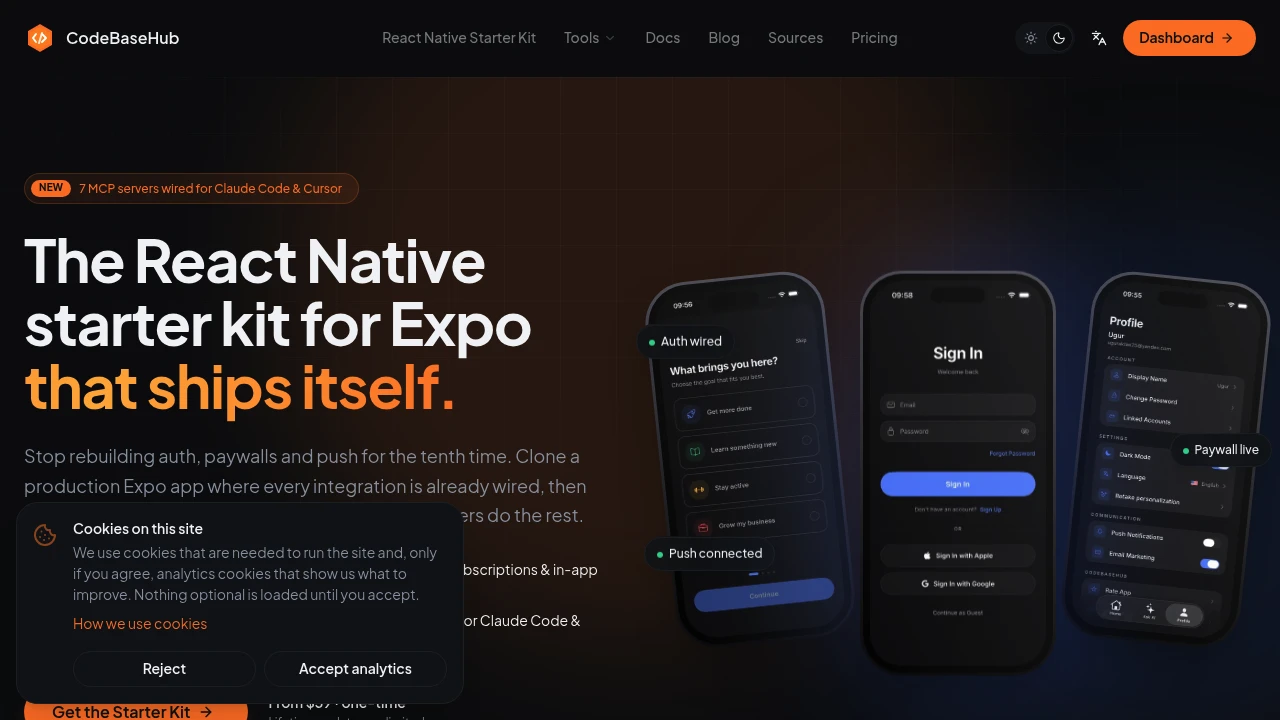
This production-ready React Native starter kit for Expo gives developers a working foundation for building and shipping iOS and Android apps without starting from a blank template. It comes with authentication, subscriptions, push notifications, onboarding, localization, email, attribution, and app store build configuration already connected, so developers can spend more time building product features instead of wiring core services together.
The kit combines a complete starter app with AI-editor access to the connected services. Claude Code and Cursor can work with Firebase, RevenueCat, Expo, OneSignal, Airbridge, HeroUI Native, and Plunk through seven MCP servers, making it possible to inspect data, test services, and trigger development workflows directly from the editor.
Key Features
Firebase Authentication
The starter kit includes Firebase Auth with multiple authentication methods and account-management flows:
- Email authentication
- Apple sign-in
- Google sign-in
- Guest access
- Password reset
- Linked accounts
This provides a ready-made authentication foundation instead of requiring developers to build and connect these flows from scratch.
RevenueCat Subscriptions
Monetization is integrated through RevenueCat, including:
- Subscriptions
- In-app purchases
- Entitlement checks
- Paywall functionality
Developers can start with subscription logic already connected to the application and focus on their own pricing and product experience.
OneSignal Push Notifications
Push notification infrastructure is already configured with OneSignal. The starter includes permissions, device tokens, deep links, and a user-facing notification settings toggle.
This gives developers a complete starting point for implementing notification-driven app experiences.
AI Editor Integration With 7 MCP Servers
The kit includes seven MCP servers that allow Claude Code and Cursor to interact with connected services directly from the development environment.
Supported services include:
- Firestore
- RevenueCat
- Expo
- OneSignal
- Airbridge
- HeroUI Native
- Plunk
This means AI coding tools can work with more than just the local codebase. Developers can inspect subscriber state, check Firebase data, send test pushes, and interact with build and service workflows without constantly switching between tools.
Multi-Language Support
The starter supports more than 10 languages, including Arabic with right-to-left support. It also includes an in-app language picker so users can change their preferred language directly within the application.
EAS Build and Submit
Expo Application Services configuration is included for building and submitting apps to both major mobile platforms:
- Apple App Store
- Google Play
The existing configuration provides a starting point for production build and submission workflows.
HeroUI Native Theming
HeroUI Native provides the application's UI theming foundation with support for both dark and light modes. Developers can use the existing theme setup while building their own product interface and components.
Plunk Email Integration
Plunk is integrated for several email-related workflows, including:
- Onboarding emails
- Marketing emails
- Consent-related communication
- Transactional emails
This gives the application an existing foundation for communicating with users throughout the product lifecycle.
Production-Ready App Foundation
The kit goes beyond providing UI screens. It includes real application screens for common product flows, including:
- Sign-in
- Onboarding
- Language selection
- Profile
- Settings
It also includes configuration for Crashlytics and Airbridge attribution, providing foundations for crash monitoring and attribution tracking.
Built For Expo Developers
This starter kit is designed for developers shipping iOS and Android applications with Expo who want a functional application architecture rather than a collection of disconnected screens.
The architecture is documented in AGENTS.md and CLAUDE.md, helping Claude Code and Cursor understand how the codebase and connected services are organized. This makes the documentation useful not only for developers but also when using AI coding tools to make changes across the project.
Common Use Cases
Launching a New Mobile App
Start with authentication, onboarding, payments, notifications, localization, and store configuration already connected instead of assembling the infrastructure individually.
Subscription-Based Apps
Use the RevenueCat integration for subscriptions, in-app purchases, entitlements, and paywalls.
AI-Assisted Development
Give Claude Code or Cursor access to connected application services through the included MCP servers, allowing AI tools to work with both the codebase and supported external services.
Multi-Language Applications
Build applications for international audiences with more than 10 languages, an in-app language picker, and RTL support for Arabic.
Production App Development
Use the included EAS Build and Submit configuration, Crashlytics setup, attribution configuration, authentication, notifications, and other connected services as the foundation for a production application.
Connected Services, Not Just Screens
A major difference between this kit and a basic React Native template is the amount of application infrastructure already wired together. Authentication, monetization, notifications, email, localization, analytics-related configuration, and app-store workflows are integrated into the starter.
The MCP layer extends that approach into the development workflow. Instead of treating AI coding assistants as tools that only edit files, developers can give them structured access to supported services through the seven included MCP servers.
Pricing
The kit uses one-time pricing with lifetime updates and unlimited app use, giving developers ongoing access without a recurring starter-kit subscription.
Why It Matters
Starting a React Native application from a blank Expo template often means spending significant development time connecting authentication, payments, notifications, email, localization, attribution, and deployment infrastructure before meaningful product work begins.
This starter kit provides those foundations as part of a working application, while also adding AI-editor access to the services behind them. For developers using Expo alongside Claude Code or Cursor, that combination can make the kit useful both as an application foundation and as an AI-friendly development environment.
Start Building With a Production React Native Foundation
Build on an Expo starter that already includes authentication, subscriptions, push notifications, localization, onboarding, email, attribution, and store deployment configuration. With connected services and MCP access for AI coding tools, you can move from setup and service wiring toward building the actual product.


