
PianoFlow
A browser-based piano studio that turns MIDI, MusicXML, PDFs, and sheet-music photos into playable lessons with feedback, visuals, and teaching tools.
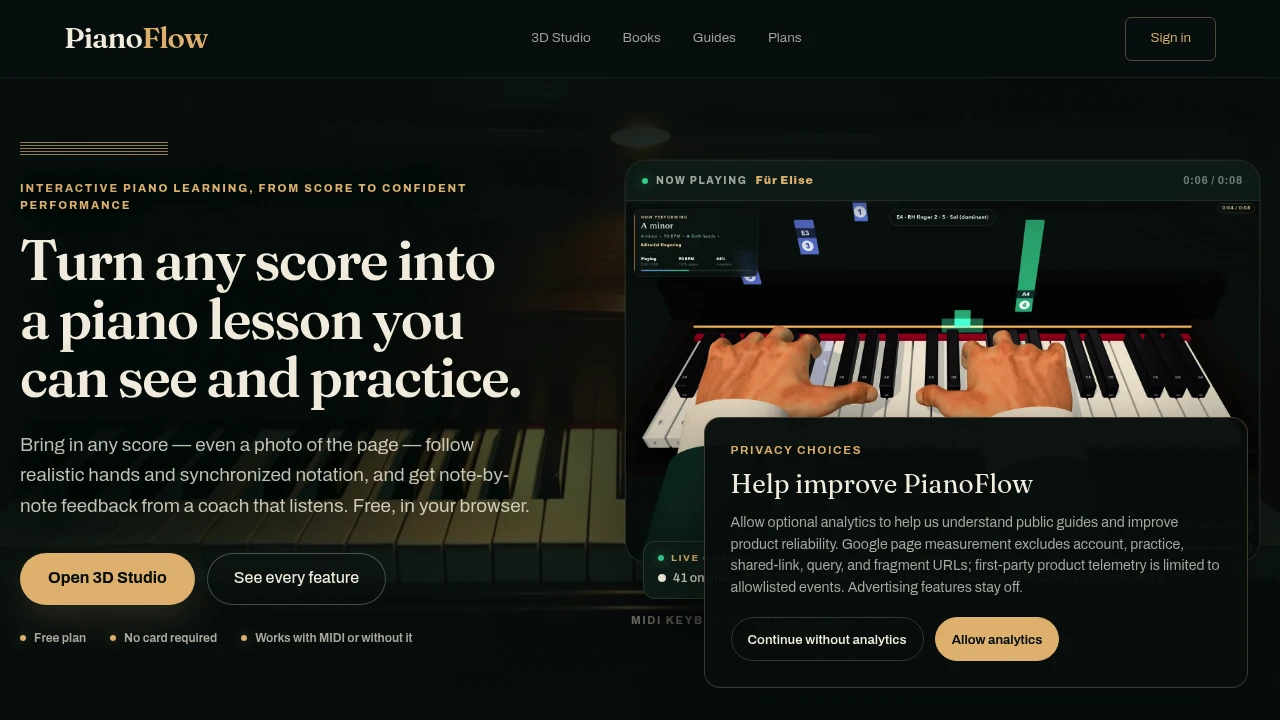
Turn sheet music into something you can practice right away with a browser-based piano studio for learners, teachers, and music creators. Import MIDI, MusicXML, MXL, LilyPond, PDFs, or even a photo of sheet music, then transform the score into an editable and playable lesson with synchronized notation, realistic hands, and falling notes.
The studio brings sheet music, guided practice, performance visualization, and teaching tools into one workspace. You can edit notes, measures, tempo, and fingering, slow down difficult passages, loop tricky bars, practice individual hands, and keep recordings and practice settings with your work. It also works without a MIDI keyboard for selected activities using touch or computer keys.
Key Features
Score Import And Editing
Bring existing music into the browser and turn it into an editable practice lesson.
Supported formats include:
- MIDI
- MusicXML
- MXL
- LilyPond
- Photos of sheet music
Once imported, you can work with notes, measures, tempo, and fingering directly in the studio.
Synchronized Piano Practice
Follow the score while watching realistic hands, the keyboard, and falling notes move together.
The synchronized practice view helps connect notation with rhythm, fingering, and the physical movement of playing without requiring separate tools for the score and performance view.
You can also:
- Slow down passages
- Loop difficult bars
- Practice one hand at a time
- Follow synchronized sheet music
- Keep recordings and practice settings with your work
Listening Coach
Get note-by-note feedback on your playing.
The Listening Coach scores timing, rhythm, and duration, helping identify where a performance differs from the expected passage.
Instead of simply telling you that a section needs work, the feedback can show which aspects of the performance need attention.
Adaptive Practice
Turn weaker sections into focused practice loops.
Adaptive practice identifies weak bars and converts them into targeted loops, giving learners a way to spend more time on the sections that need it rather than repeatedly playing the entire piece.
3D Practice View
Practice with an interactive visual representation of the piano.
The 3D practice view combines:
- Realistic hands
- On-screen keyboard
- Synchronized sheet music
- Falling notes
This creates a more visual way to connect what is written on the page with what is being played on the keyboard.
Practice Without A MIDI Keyboard
You do not need a MIDI keyboard for every activity.
Selected practice activities can be performed using touch controls or computer keys, allowing you to work through lessons and interact with the on-screen score directly from a browser.
Arcade Games
Build musical skills through interactive practice games.
Available activities cover areas such as:
- Chord reading
- Memory
- Progressions
- Rhythm
These provide an alternative to traditional score-based practice while reinforcing core reading and musical skills.
Teaching Tools
Teachers can use the studio to organize lessons and manage student assignments.
Teaching features include:
- Courses
- Invitations
- Assignments and submissions
- Comments
- Grading
This makes the platform useful beyond individual practice, providing a workspace for structured teaching and feedback.
Performance Visuals
Turn performances into more visual presentations.
The studio supports performance-oriented visualizations such as:
- MIDI views
- Particle effects
- Heatmaps
- Finger-camera lessons
These tools can help creators present piano performances in formats that are more visual than traditional sheet music alone.
Cloud Sync And Offline Lessons
Keep practice work available across devices with cloud synchronization and offline lesson support.
Practice settings and recordings can stay connected to your work while offline lessons provide a way to continue practicing when an internet connection is unavailable.
Built For Learners, Teachers, And Creators
Piano Learners
Use guided practice, adaptive loops, note-by-note listening feedback, synchronized notation, and visual piano views to focus on the parts of a piece that need the most work.
Music Teachers
Create courses, invite learners, manage assignments, review submissions, leave comments, and grade student work.
Music Creators
Use MIDI views, particle effects, heatmaps, and finger-camera lessons to present performances with additional visual context.
Common Use Cases
Learning A New Piece
Import existing sheet music and move from a first read-through into guided practice without switching between notation and piano tools.
Fixing Difficult Passages
Slow down challenging sections, loop weak bars, and practice one hand at a time until the passage becomes more comfortable.
Rhythm And Timing Practice
Use the Listening Coach to receive note-by-note scoring for timing, rhythm, and duration.
Teaching Piano Online
Build courses, send invitations, collect submissions, provide comments, and grade student work in the same browser-based environment.
Creating Piano Performance Content
Combine a performance with MIDI views, particle effects, heatmaps, or finger-camera lessons for a more visual presentation.
Pricing
The studio is free to start in the browser.
A paid tier adds larger imports, cloud storage, and teaching features.
Why It Matters
Learning from sheet music often means moving between a score, a metronome, practice exercises, recordings, and other tools. This piano studio brings those activities into a single browser-based workspace.
With score import and editing, synchronized notation, realistic hands, falling notes, adaptive practice, note-by-note feedback, teaching workflows, and performance visuals, it supports the full path from first read-through to a finished take.
Turn Sheet Music Into Practice
Bring your score into the browser, edit it, play it, slow it down, loop the difficult parts, and track what needs improvement. Whether you are learning a piece, teaching students, or creating a visual performance, the studio provides one place to turn sheet music into an interactive piano lesson.


