
RipeWork
A native macOS menu bar Pomodoro timer that syncs Google Tasks and hands selected tasks to an AI coding agent.
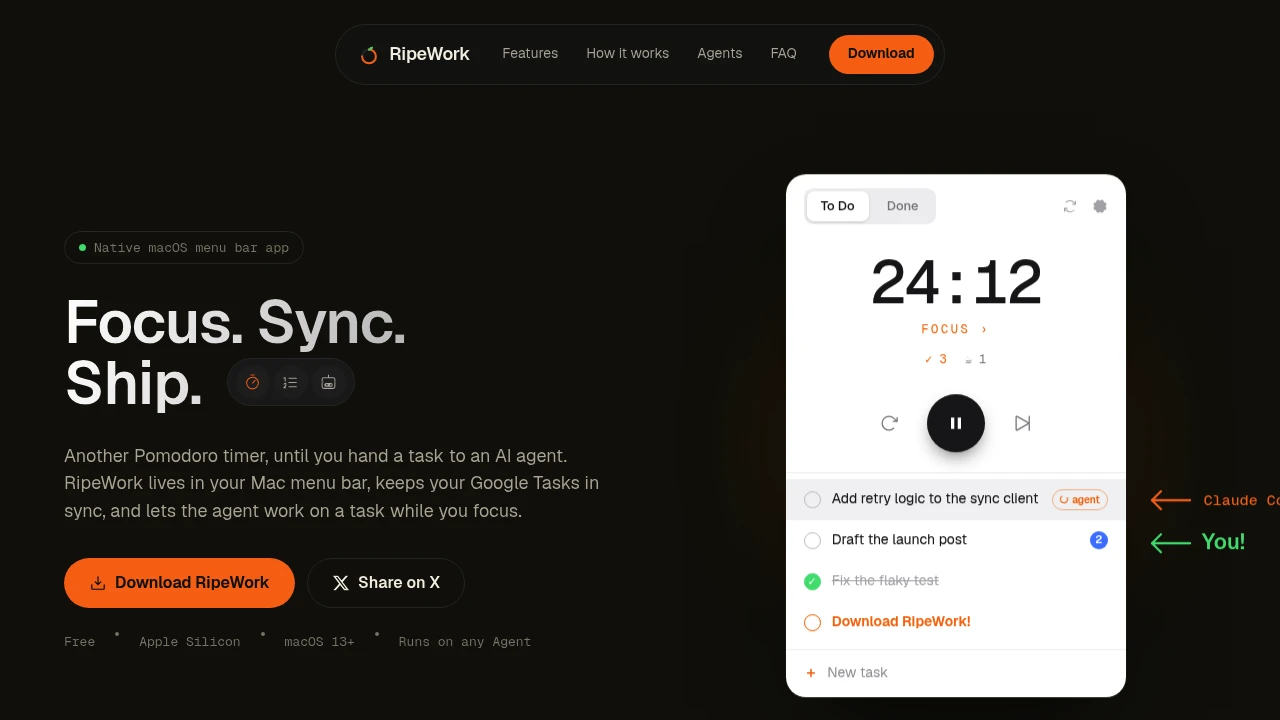
This native macOS menu bar app combines a Pomodoro timer with task management and optional AI coding agent handoffs. It is designed for developers and solo workers who already organize their work around tasks and want to reduce the copy, paste, and context switching between their task list, focus timer, and coding environment.
The app works without an account, with local tasks, statistics, and session logs remaining on the Mac. If you connect Google Tasks, changes can sync between the app and Google, while the timer itself remains useful as a standalone focus tool.
Key Features
Task-Based Pomodoro Sessions
Tie focus sessions directly to real tasks rather than running a timer separately from your work plan.
The menu bar workflow keeps your active task and focus session close together, making it easier to maintain context throughout a work block.
AI Coding Agent Handoff
Select a task from the menu bar and hand it to an AI coding agent.
The app turns the selected task into the prompt for you and launches your local Claude Code CLI. Progress is streamed directly into the menu bar popover while the agent works.
The agent:
- Runs locally
- Uses the folder you explicitly point it to
- Starts only when you initiate the handoff
- Streams progress in the app
This keeps the coding-agent workflow connected to your task list without introducing unattended background runs.
Transcript History
Every AI agent run is saved as a timestamped Markdown record.
You can use these records to:
- Read previous runs
- Continue earlier work
- Review what happened
- Try a different direction
Keeping transcripts as Markdown also makes the history easy to read and work with later.
Google Tasks Sync
Connect Google Tasks when you want your task list available across the app and Google.
The app can:
- Create tasks
- Rename tasks
- Reorder tasks
- Complete tasks
- Delete tasks
Changes are pushed to Google when an account is connected.
Local-First Storage
Tasks, statistics, and session logs stay on your Mac.
Google is only involved when you explicitly choose to connect and sync an account. You can therefore use the core task and focus workflow without requiring an online account.
Break Overlay
When a focus session ends, a full-screen break overlay takes over the screen.
It includes:
- A countdown
- Breathing-focused presentation
- Rotating tips
- Escape-key skip
This creates a clear separation between focused work and scheduled breaks.
Focus & Session History
Track your work patterns over time with simple session statistics.
The app includes:
- Monthly heatmap
- Session log
- Average session durations
- Recent focus counts
- Recent break counts
These provide a lightweight view of consistency without turning the timer into a complicated productivity dashboard.
Built For Developers & Solo Workers
The app is designed for people who want their task planning and focus sessions connected without adopting a large productivity suite.
It is particularly useful for:
- Developers working through coding tasks with Claude Code
- Solo workers managing their own daily task lists
- Indie developers balancing multiple development tasks
- Focused knowledge workers who prefer Pomodoro-style sessions
- Mac users who want a lightweight menu bar workflow
Common Use Cases
- Focused coding: Select a development task and start a focused Pomodoro session.
- AI-assisted development: Hand a task to Claude Code without manually copying the task into a prompt.
- Task-driven work: Keep the current work item connected to the focus timer.
- Google Tasks workflows: Sync tasks between the Mac app and Google Tasks.
- Agent session review: Read previous Claude Code runs from timestamped Markdown transcripts.
- Deep work: Use focus sessions and a dedicated break overlay to create clearer work intervals.
- Productivity tracking: Review monthly focus patterns, session durations, and break activity.
- Offline task management: Continue using local tasks and the timer without an account.
Why It Matters
Task lists and Pomodoro timers are often separate from the actual work being performed. For developers using AI coding agents, that can introduce another layer of context switching: find the task, copy its details, open the agent, paste the prompt, and then return to the task manager.
This app connects those pieces through the macOS menu bar. A task can become the starting prompt for a local Claude Code session, while the resulting transcript is automatically preserved as a Markdown record for later review.
At the same time, the AI agent is optional. The local task list, timer, break workflow, and session tracking continue to work without using the coding-agent features. Google Tasks is also optional, giving users a local-first setup with external synchronization only when they choose it.
The result is a focused productivity workflow built around tasks, timed work sessions, and optional AI execution, rather than a general-purpose productivity suite.
Focus on Tasks With a Native macOS Workflow
Keep tasks, Pomodoro sessions, breaks, and focus history in one menu bar app, with optional Google Tasks synchronization and local Claude Code handoffs. Built natively with SwiftUI, the app stays out of your Dock and keeps the core workflow local on your Mac.


