
Crew Tower
Turns the MacBook notch into a control strip for AI coding agents, with approve, deny, answer, and tab jumping from one place.
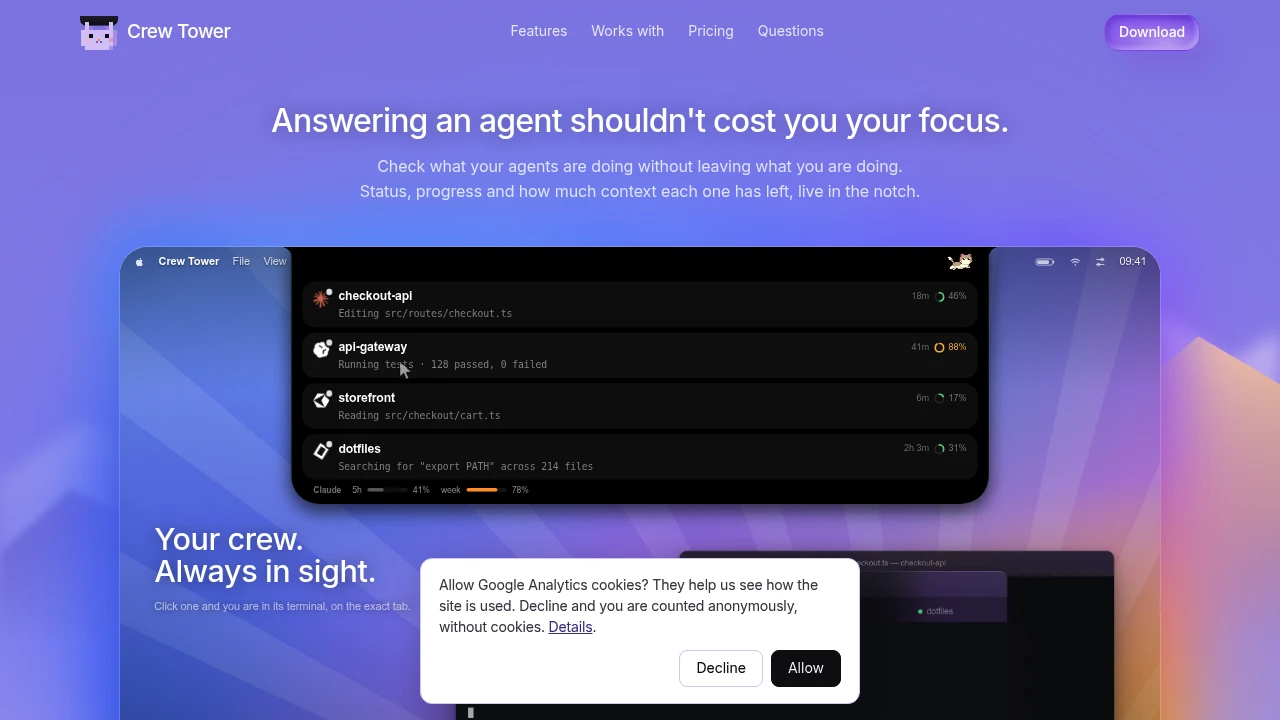
Crew Tower is a Mac app for developers who run multiple AI coding agents at the same time and want to manage them without constantly checking different terminal windows. It puts session status, pending prompts, plans, test activity, and context usage in the MacBook notch or a floating panel, making it easier to keep track of agents while working elsewhere.
The app is designed around active coding workflows where agents may stop and wait for approval, ask a question, present a plan, or require attention before continuing. Instead of switching back to each terminal manually, you can see these events as actionable cards and respond directly from the interface.
Key Features
Agent Session Monitoring
Keep track of multiple AI coding sessions from one place.
Crew Tower shows information such as:
- Current session status
- Agent progress
- Pending prompts
- Waiting commands
- Test activity
- Finished sessions
- Remaining context
This makes it easier to see which agents are actively working and which ones need your attention.
Approve or Deny Agent Prompts
Respond to approval requests without switching back to the terminal.
When an agent asks for permission to continue or run a command, you can:
- Approve the request
- Deny the request
- Send the decision back through the agent's existing local communication channel
This can reduce the need to constantly jump between your editor, browser, and terminal windows.
Answer Agent Questions
Respond when an AI coding agent needs a decision.
Crew Tower can surface questions from active sessions and let you select or provide an answer. The response is then sent back in the format expected by the agent.
This is useful when several agents are working independently and may pause at different points for clarification.
Review Plans Before Execution
Inspect agent-generated plans before allowing work to continue.
The interface supports plan review, including longer plans that can be viewed inside the panel.
You can use this to:
- Read the proposed approach
- Review implementation steps
- Decide whether the plan should continue
- Keep plan review separate from the terminal window
This gives developers another checkpoint before an agent begins making changes.
Jump to the Correct Terminal Session
Move directly to the terminal tab where an agent is running.
This is useful when multiple sessions are working on:
- The same project
- Different repositories
- Different directories
- Separate tasks within the same codebase
Instead of searching through terminal tabs manually, Crew Tower helps connect the session card back to the relevant running process.
Context and Usage Tracking
Keep an eye on context consumption and model usage.
Crew Tower can show:
- How full an agent's context window is
- Remaining Claude usage
- Remaining Codex usage
This can help developers identify sessions that may be approaching context limits or usage quotas.
Support for Multiple AI Coding Agents
Use Crew Tower alongside several common AI coding tools.
Supported workflows include agents such as:
- Claude Code
- Codex
- Cursor
- Gemini CLI
- Qwen Code
- opencode
This makes it useful for developers who switch between different agent ecosystems instead of relying on a single coding assistant.
Dangerous Command Awareness
Review potentially destructive shell actions before approving them.
Crew Tower can call attention to commands that may have a destructive effect, giving you an opportunity to inspect the request before allowing the agent to continue.
This can be particularly useful when agents are working with:
- File deletion
- Repository changes
- System commands
- Other actions that need human approval
Local Terminal Integration
Work with your existing terminal sessions rather than moving everything into a separate remote environment.
Crew Tower works locally and sends decisions back through the local channels already used by the running agents. It does not rely on simulated keystrokes to communicate your responses.
Built for Developers Running Multiple AI Agents
Crew Tower is designed for people who regularly have several AI coding sessions running at once.
It can be useful for:
- Software developers
- AI-assisted programmers
- Engineers running parallel coding tasks
- Developers using multiple coding agents
- Technical teams experimenting with agent workflows
- Power users managing long-running terminal sessions
The workflow is especially useful when agents spend time working in the background and only occasionally require a decision, approval, or answer.
Common Use Cases
- Monitoring several AI coding agents at once
- Approving commands without switching to the terminal
- Reviewing implementation plans before execution
- Answering questions from paused agents
- Tracking agent context usage
- Monitoring Claude or Codex usage quotas
- Jumping to the correct terminal tab
- Reviewing potentially destructive commands
- Managing parallel coding tasks across multiple projects
- Keeping background agent activity visible while working in another app
Why It Matters
Running multiple AI coding agents can create a new kind of workflow problem. The agents may be doing useful work in the background, but they can also stop unexpectedly while waiting for an approval, clarification, plan review, or command decision.
That often means repeatedly checking terminal tabs just to find out which session needs attention.
Crew Tower brings those moments into a single visible interface. Waiting commands, questions, plans, test activity, and completed sessions can be surfaced as cards, allowing you to react when needed without constantly monitoring every terminal window.
The context and quota tracking also adds another layer of visibility. When several agents are running simultaneously, it can be difficult to know which session is close to its context limit or how much model usage remains. Keeping that information available alongside session status can make longer AI-assisted coding workflows easier to manage.
Manage AI Coding Agents Without Living in the Terminal
Run your existing AI coding agents, keep track of their progress from the MacBook notch or floating panel, review plans, approve or deny commands, answer questions, monitor context and usage, jump directly to the correct terminal session, and keep potentially dangerous actions visible before approving them.
Crew Tower runs on macOS 15 or later. On Macs with a notch, it appears there, while other displays use a floating pill with the same core workflow.


