
DBC Utility
Desktop software for viewing, editing, comparing, and validating CAN and CAN FD DBC files on Windows and Linux.
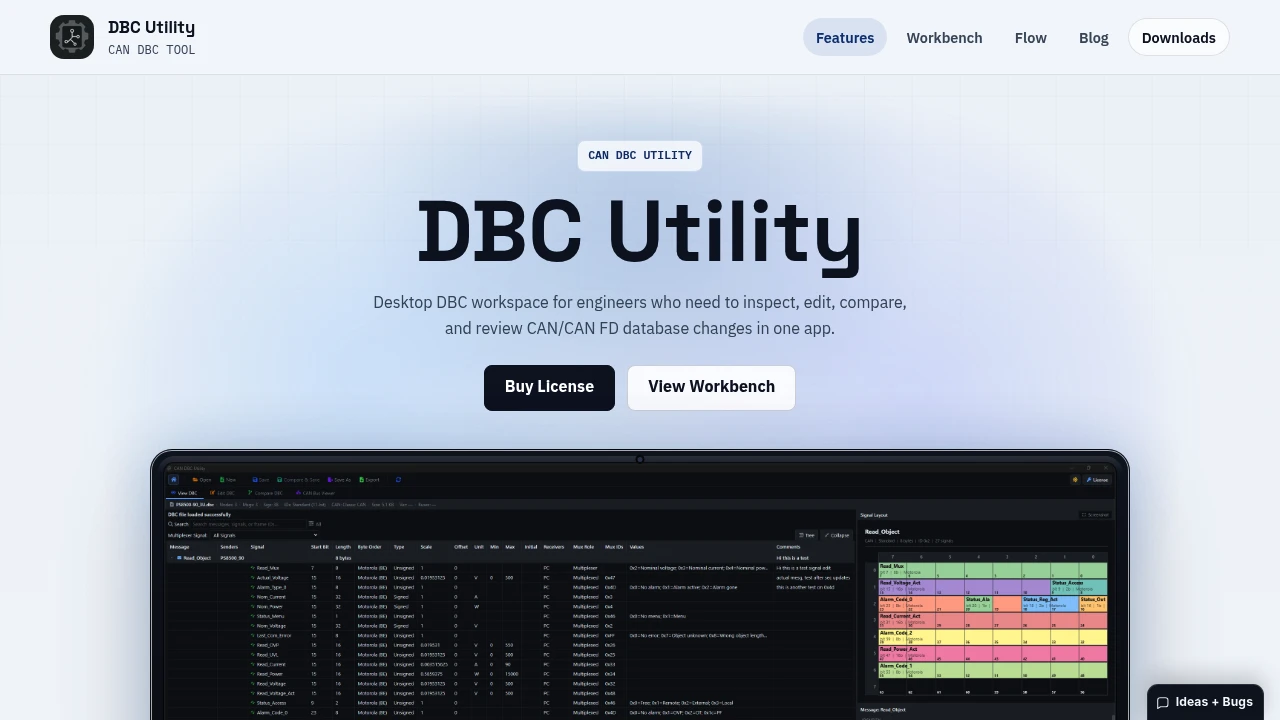
DBC Utility is a desktop workspace for engineers who work with CAN and CAN FD database files. It brings DBC file viewing, editing, comparison, and bit-level layout inspection into one application, making it easier to review database changes without switching between separate tools.
The app is designed for engineers who maintain DBC files and need to inspect message and signal definitions before saving changes. It works offline and supports both Windows and Linux, making it suitable for day-to-day database maintenance where local file access and an uninterrupted workflow matter.
Key Features
DBC File Viewer
Browse the structure and contents of a DBC file from the viewer.
You can inspect:
- Nodes
- Messages
- Signals
- Frame IDs
- Metadata
- Comments
- File statistics
This provides a quick way to understand the database before making changes.
DBC Editor
Edit message and signal definitions directly within the application.
Editing includes:
- Message settings
- Signal encoding fields
- Value choices
- Receivers
- Comments
- Multiplexing data
This keeps common DBC maintenance tasks inside the same workspace as file inspection.
Side-by-Side and Structured Compare
Review changes between DBC revisions before committing them.
DBC Utility provides multiple comparison views:
- Side-by-side diff
- Unified diff
- Structured diff
This makes it easier to identify what changed and review database revisions in the format that best fits the task.
CAN and CAN FD Bit Layout
Use the bit-level visualizer to inspect how CAN and CAN FD payloads are packed.
The layout view provides a visual way to check signal placement and payload structure, helping engineers verify that definitions match the intended message layout.
Multiplexing Support
Work directly with multiplexed messages rather than treating them as ordinary message definitions.
You can:
- Filter multiplexed messages
- Edit mux roles
- Edit mux signals
- Edit mux IDs
This makes the workspace suitable for DBC files that rely on multiplexing to represent different message layouts.
Persistent File Context
The same DBC file stays in context as you move between the viewer, editor, compare, layout, and home screens.
That is useful when a change requires more than a simple edit. You can inspect the database structure, modify a definition, check the resulting payload layout, and review differences before writing the file.
Rather than opening separate tools for each stage, the workflow keeps the database available as you move through the different inspection and editing tasks.
Built For CAN Engineers
DBC Utility is designed for engineers who regularly maintain and review CAN and CAN FD database files.
It can be useful for:
- Automotive engineers
- CAN database maintainers
- Embedded engineers
- Engineers reviewing signal definitions
- Teams working with CAN FD payloads
- Engineers managing multiplexed messages
- Anyone who needs offline DBC inspection and editing
Common Use Cases
Reviewing a DBC File
Open a database and inspect nodes, messages, signals, frame IDs, comments, metadata, and file statistics before making changes.
Editing Signal Definitions
Update encoding fields, receivers, value choices, comments, or other signal-level information directly in the editor.
Reviewing Database Revisions
Compare two revisions using side-by-side, unified, or structured diff views to understand exactly what has changed.
Checking Payload Packing
Use the bit-level layout visualizer to inspect CAN or CAN FD payload packing and verify signal placement.
Working With Multiplexed Messages
Filter multiplexed messages and review or modify mux roles, signals, and IDs as part of the normal editing workflow.
Flexible Starting Points
You can open a DBC file from the viewer, editor, or recent files, providing multiple ways to start depending on what you need to accomplish.
Whether the task begins with inspecting an unfamiliar database, making a targeted edit, reviewing a revision, or checking a message layout, the application keeps the file in context as you move between tools.
Offline Desktop Workflow
DBC Utility runs as desktop software and works offline, with support for Windows and Linux.
This makes it suited to engineers who want to work directly with local DBC files without depending on an online workspace.
Pricing
DBC Utility is paid desktop software with a one-time Pro purchase.
The Pro license includes:
- Access on up to 2 devices
- 1 year of included updates
- Protected downloads for the current Windows and Linux builds
Why It Matters
DBC maintenance often involves more than changing a single field. Engineers may need to understand the database structure, edit message or signal definitions, verify bit-level payload packing, and compare revisions before saving.
DBC Utility combines those activities in one desktop workspace while keeping the same DBC file in context across viewing, editing, comparison, and layout inspection. For engineers working with CAN and CAN FD databases, that provides a focused workflow for reviewing and maintaining DBC files without switching between separate applications.
Inspect and Maintain DBC Files With DBC Utility
View, edit, compare, and inspect CAN and CAN FD database files from one offline desktop workspace. With DBC-aware editing, structured diffs, bit-level payload visualization, and multiplexing support across Windows and Linux, DBC Utility provides a focused environment for engineers maintaining DBC files.


