
deep imager
AI workspace for text-to-image, image-to-image, video, templates, styles, and a public gallery, with free credits to start.
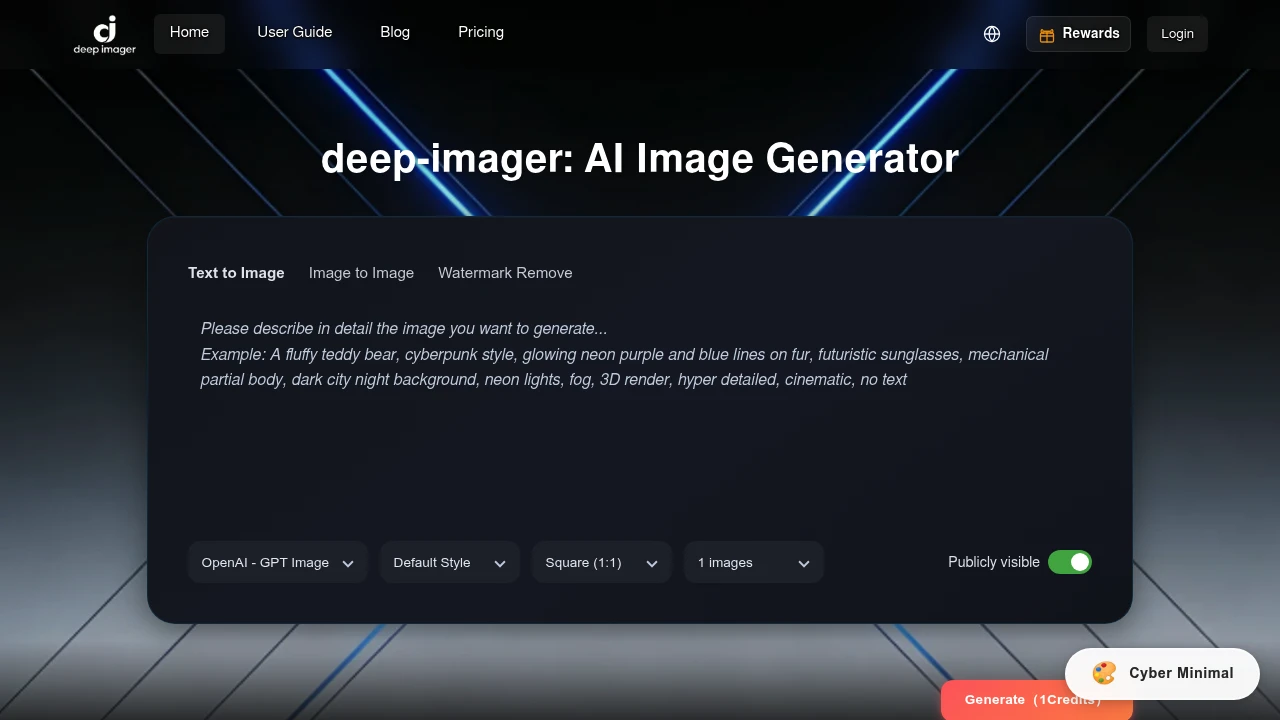
deep-imager is an AI image and video workspace for marketers, creators, e-commerce teams, game artists, educators, and studios that want to create and edit visuals without moving between separate tools. It brings text-to-image generation, image-to-image editing, AI video, watermark removal, templates, styles, and a public inspiration gallery into one browser-based workflow.
The platform is designed around a straightforward creation process. Users can describe what they want, select a model, choose a style and aspect ratio, and generate the result from the same workspace. Reference images can also be uploaded and edited using natural-language instructions, making it easier to create variations, update existing assets, or explore a different visual direction.
Key Features
Text-to-Image Generation
Create original visuals from a written description.
deep-imager allows users to enter a prompt and generate images based on the requested concept.
Users can control parts of the generation process such as:
- Text prompts
- AI model selection
- Visual style
- Aspect ratio
- Creative direction
This can be useful for creating initial visual concepts without starting from an existing image.
Image-to-Image Editing
Use an existing image as the starting point for a new variation.
Users can upload a reference image and guide changes using natural-language instructions.
This can support workflows such as:
- Creating alternate versions
- Changing the visual style
- Updating product images
- Exploring different creative directions
- Creating variations of an existing asset
- Refining visual concepts
The reference-based workflow gives users another starting point when generating from a blank text prompt is not the most suitable option.
AI Video Generation
Create video content alongside AI-generated images.
deep-imager includes AI video capabilities within the same account and workspace used for image generation and editing.
This allows users to work across different visual formats without needing to maintain separate tools for:
- AI images
- Reference-image editing
- AI-generated video
- Visual experimentation
The combined workflow can be useful for projects that require both static and moving visual assets.
Multiple AI Models
Choose between different AI models for image and video generation.
The workspace includes multiple model options, including named models such as:
- Sora 2
- Midjourney
- Other available models within the platform
This gives users the ability to select a model based on the type of output or creative direction they want to explore.
Model Selection Controls
Adjust the generation workflow based on the model being used.
Different creative tasks can require different approaches, so deep-imager allows users to select from the available model options rather than relying on a single generation system.
This can be useful when testing:
- Different visual styles
- Image quality
- Creative interpretations
- Video generation
- Alternative outputs from the same concept
Users can compare different directions while keeping the work inside the same workspace.
Style Support
Apply visual styles to generated work.
deep-imager includes style options that can help users guide the appearance of generated visuals.
This can support work involving:
- Advertising concepts
- Social graphics
- Product visuals
- Creative illustrations
- Game concepts
- Educational materials
- Presentation assets
Style controls can help users move toward a particular visual direction without rebuilding every prompt from scratch.
Template Support
Start from reusable visual formats and templates.
Templates can help speed up recurring creative tasks involving formats such as:
- Advertisements
- Thumbnails
- Slides
- Concept visuals
- Social media graphics
This can make the platform useful for teams and creators who regularly produce similar types of visual content.
Aspect Ratio Controls
Generate visuals in formats suited to different publishing channels.
Users can choose an aspect ratio as part of the generation workflow.
This can help prepare visuals for different uses such as:
- Social media posts
- Advertisements
- Website graphics
- Presentation slides
- Thumbnails
- Product imagery
- Other digital formats
Selecting the format during generation can reduce the need to recreate the same concept for a different canvas later.
Watermark Removal
Remove unwanted watermark elements from images.
deep-imager includes watermark removal as part of its image editing capabilities.
This allows users to handle image cleanup tasks within the same workspace used for generation and reference-based editing.
The combined workflow can reduce the need to move an image between separate generation and cleanup tools.
Public Inspiration Gallery
Browse publicly available examples created through the platform.
The public gallery provides a place to explore generated visuals and review different creative directions.
This can help users:
- Find inspiration
- Explore visual styles
- Compare examples
- Discover prompt ideas
- Review different types of generated output
The gallery adds an exploration layer alongside the main generation workflow.
Make Same Workflow
Reuse the creative direction of an existing gallery example.
The “Make Same” option allows users to start from an existing example rather than beginning with an entirely new concept.
This can help with:
- Prompt inspiration
- Style exploration
- Faster experimentation
- Creating related variations
- Reusing an existing creative starting point
It provides a practical way to move from browsing examples to creating a new version.
Credit-Based Generation
Use credits for image and video generation.
deep-imager uses a credit-based model for its generation workflow.
New accounts receive:
- 5 free credits
The platform also displays the credit cost before generation, allowing users to understand the expected usage before running a request.
This can help users manage generation activity when comparing different models or testing multiple creative directions.
No Watermarks on Generated Work
Generate visual output without platform watermarks on the resulting work.
deep-imager does not apply watermarks to generated images and videos.
This can be useful for creators and teams preparing assets for:
- Marketing campaigns
- Social content
- Client previews
- Product visuals
- Presentations
- Creative projects
High-resolution original output is tied to membership access.
High-Resolution Originals
Access higher-resolution versions through the platform's membership options.
This provides an option for users who need output suitable for more polished or production-oriented use.
Higher-resolution assets can be useful for:
- Marketing materials
- Product visuals
- Client presentations
- Larger digital formats
- Professional creative work
Built for AI Image and Video Creation
deep-imager combines text-to-image generation, reference-image editing, AI video creation, model selection, styles, templates, watermark removal, and public examples into one browser-based visual workspace.
Key benefits include:
- Generate images from text prompts
- Edit and transform reference images
- Create image variations
- Generate AI video
- Choose between multiple AI models
- Access models including Sora 2 and Midjourney
- Apply visual styles
- Use templates for recurring creative work
- Select aspect ratios before generation
- Remove unwanted watermarks
- Browse a public gallery for inspiration
- Reuse examples with Make Same
- See credit costs before generating
- Start with 5 free credits
- Generate work without platform watermarks
- Access high-resolution originals through membership
- Keep image and video workflows in one workspace
Built For
- Content Creators
- Marketing Teams
- E-commerce Sellers
- Designers
- Game Artists
- Educators
- Social Media Managers
- Advertisers
- Studios
- Agencies
- Product Marketers
- Founders
- Creative Teams
Common Use Cases
- Creating advertising visuals
- Generating product images
- Editing an existing image with AI
- Creating multiple variations of a visual asset
- Generating social media graphics
- Designing thumbnails
- Creating presentation visuals
- Producing lesson illustrations
- Developing game concepts
- Creating pre-visualization material
- Testing different visual styles
- Generating video concepts
- Creating creative assets from reference images
- Browsing AI-generated work for inspiration
- Reusing a gallery example as a creative starting point
- Comparing outputs from different AI models
Why It Matters
AI image generation often involves switching between separate tools for prompting, editing, video creation, style experimentation, and asset cleanup. This can make the workflow more fragmented, particularly when a project begins with an idea, develops through multiple variations, and eventually requires different formats or media types.
deep-imager brings these tasks into a single browser-based workspace. Users can start with a text prompt, upload a reference image, select a model, choose a style and aspect ratio, generate a visual, and continue exploring variations without moving the project into a separate application.
The public gallery also adds a practical starting point for users who do not want to begin with an empty prompt box. By browsing examples and using the “Make Same” workflow, users can move from inspiration toward their own generated version.
The combination of image generation, reference-based editing, AI video, templates, styles, and credit visibility makes the platform suitable for repeated creative work where users need to test, compare, and reuse visual ideas.
Generate, Edit, Compare, and Reuse AI Visuals From One Workspace
Describe a visual with a text prompt or upload a reference image, choose from available AI models, apply styles and templates, select an aspect ratio, generate images or AI video, create variations, remove unwanted watermarks, browse public examples for inspiration, reuse a creative direction with Make Same, review credit costs before generating, and keep your image and video workflow together in one browser-based workspace.


