
Timespree
Create a group availability poll, share one link, and see the best meeting time on a clear heatmap. Free and mobile-friendly.
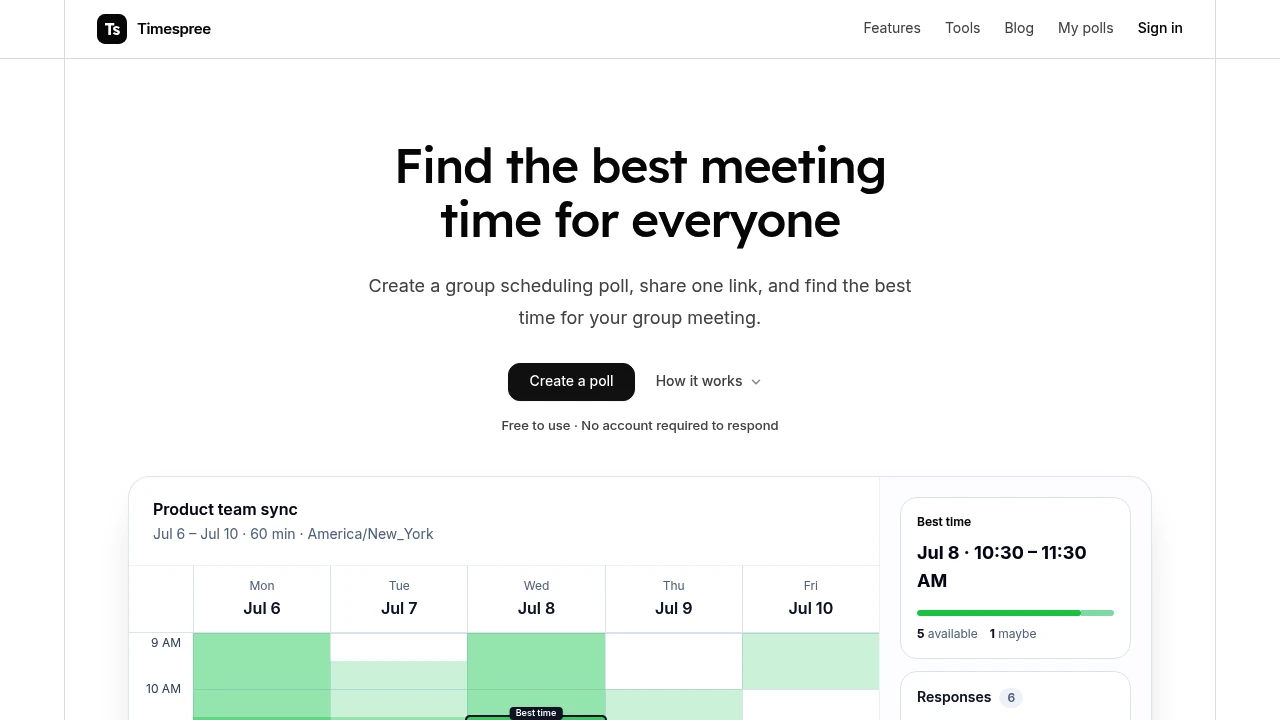
Find a meeting time quickly without the usual back-and-forth. This group scheduling poll lets organizers create an event, share one link, and collect availability from everyone without requiring participants to create an account. It is designed for teams, class groups, volunteer organizers, and anyone coordinating a time across multiple people.
The main scheduling view uses a heatmap to show where availability overlaps, making the strongest time slots easy to spot. Organizers can compare availability across the entire group or focus only on people who are required to attend, then confirm the final time and send it to a calendar.
Key Features
No Account Required to Respond
Participants can open the shared poll link and submit their availability from any device without signing up.
This keeps the response process simple, particularly when coordinating with people outside your team or organization.
- No account required for participants
- Respond directly from a browser
- Works across devices
- Free shared links
- No limit on responses
Availability Heatmap
The main view presents group availability as a heatmap, making overlapping time windows easier to identify at a glance.
You can review the availability of the full group or focus only on the people who must attend, helping distinguish between a convenient slot and one that works for the essential participants.
Flexible Time Options
Create polls around specific times or broader availability windows. You can configure different hours for different dates and repeat a weekly availability pattern.
This provides more flexibility than a simple list of fixed meeting times.
- Set exact times
- Set full-day availability
- Use different hours by date
- Repeat weekly patterns
Calendar Import
Import existing busy times from supported calendars to make availability responses easier and more accurate.
Supported calendar sources include:
- Google Calendar
- Outlook
- Apple Calendar
You can also choose which imported calendars should be considered when determining availability.
Time Zone Conversion
Keep a single event time zone while allowing each participant to see the proposed times in their own local time zone.
This is useful for distributed teams, online classes, volunteer groups, and other situations where participants may be located in different regions.
The organizer can keep the event's time zone fixed while participants receive the corresponding local-time view.
Response Reminders
Send reminders to people who have not submitted their availability yet. This helps organizers avoid manually checking who has responded and following up with each person separately.
Calendar Confirmation
Once the group has settled on a time, send the confirmed event to a calendar.
The final time can be added through:
- Google Calendar
- Outlook
- ICS file
Built For Groups
The scheduling tool is designed for situations where multiple people need to agree on a time without creating unnecessary coordination work.
It works well for:
- Teams
- Class groups
- Volunteer organizations
- Community groups
- Informal gatherings
- Distributed participants
Participants can respond from a browser on their phone or computer without installing a dedicated app.
Common Use Cases
Team Meetings: Find a time that works across a team without sending multiple rounds of availability messages.
Class Scheduling: Coordinate study groups, classes, or other academic gatherings.
Volunteer Coordination: Find a workable slot among volunteers with different schedules.
Remote Meetings: Compare availability across time zones while keeping one event time zone for the organizer.
Group Events: Collect availability from larger groups without requiring everyone to create an account.
Recurring Meetings: Use weekly availability patterns when coordinating regular sessions.
Shared Workspace for Teams
The basic poll link remains free and does not limit the number of responses. Signing in adds a shared workspace where team polls can be managed from one dashboard.
The workspace includes:
- Team polls in one place
- Unlimited workspaces
- Email invitations for teammates
This gives occasional organizers a simple link-based workflow while providing teams with a more centralized way to manage recurring scheduling.
From Availability to Calendar Event
The workflow is straightforward: create the event, share the link, collect availability, compare the overlap, confirm the time, and add it to a calendar.
The heatmap provides the visual overview, while calendar imports, time zone conversion, reminders, and calendar confirmation handle the practical details that can otherwise make group scheduling cumbersome.
Why It Matters
Finding a meeting time often becomes a long exchange of messages, especially when participants have different schedules or time zones. A scheduling poll reduces that process to one shared link and a single availability view.
By combining a visual overlap heatmap with flexible time settings, calendar imports, reminders, time zone conversion, and direct calendar confirmation, the tool makes it easier to move from scattered availability to a confirmed meeting time.
Find a Meeting Time Faster
Create a scheduling poll, share one link, and let everyone submit their availability without signing up. With a heatmap for spotting overlap, calendar imports, time zone conversion, response reminders, and calendar confirmation, the tool provides a simple way to coordinate group meetings without the usual back-and-forth.


